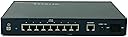
🔐 Secure your digital empire with NETGEAR’s ProSafe VPN Firewall!
The NETGEAR FVS318 ProSafe VPN Firewall combines an 8-port 10/100 Mbps Ethernet switch with advanced business-class security features including an SPI firewall, Intrusion Detection System, and eight dedicated VPN tunnels. Designed for small offices and remote site connectivity, it supports up to 253 users with easy web-based setup and is backed by a 3-year warranty, delivering reliable wired network protection and encrypted VPN links at an accessible price point.
| ASIN | B00006B9HC |
| Antenna Location | Home |
| Antenna Type | Internal |
| Best Sellers Rank | #227,056 in Electronics ( See Top 100 in Electronics ) #1,456 in Computer Routers |
| Brand | NETGEAR |
| Compatible Devices | Desktop |
| Connectivity Protocol | Ethernet |
| Connectivity Technology | Wired |
| Control Method | Touch |
| Controller Type | Switch |
| Coverage | Up to 8 simultaneous VPN connections |
| Customer Reviews | 4.0 out of 5 stars 86 Reviews |
| Data Transfer Rate | 100 Megabits Per Second |
| EU Spare Part Availability Duration | 3 Years |
| Frequency Band Class | Single-Band |
| Global Trade Identification Number | 00606449023381, 10606449023388 |
| Is Electric | No |
| Is Modem Compatible | No |
| Item Dimensions L x W x H | 9.95"L x 7.1"W x 9.95"H |
| Item Weight | 3.7 Pounds |
| LAN Port Bandwidth | 10/100 megabits_per_second |
| Manufacturer | Netgear |
| Maximum Upstream Data Transfer Rate | 100 Megabits Per Second |
| Mfr Part Number | FVS318NA |
| Model Name | NETGEAR FVS318 ProSafe VPN Firewall |
| Model Number | FVS318NA |
| Number of Ports | 8 |
| Operating System | [Proprietary router operating system] |
| Other Special Features of the Product | WPS |
| Recommended Uses For Product | Home |
| Security Protocol | WPA2-PSK |
| Special Feature | WPS |
| UPC | 606449023381 |
| Unit Count | 1 Count |
J**T
A excellent perimeter defense appliance with outstanding remote VPN capabilities
As a security consultant, I consult people everyday on the need for a solid defense-in-depth strategy to protecting their network resources from potential attacks. The same applies to your home networks! Most broadband/HSI providers do not provide much in terms of securing "your assets", but rather, are interested in protecting their own. Often times, the perimeter equipment that is recommended (such as a typical wireless AP/router) does not really provide much in terms of security, and does nothing in terms of providing remote connectivity to resources on your home network when away. In comes the FVS318 Firewall with built-in IP Security (IPSec) Virtual Private Networking (VPN) capabilities. The appearances of this appliance seemed to meet almost all of my basic requirements ... with one key exception: NetGear does NOT provide support for remote Mac OS X clients in any of their VPN solutions and corresponding documentation. Most client OS's support VPN's (Windows XP/7, Mac OS X, Linux/Ubuntu, Android, iOS, etc.) that require a "login mechanism" for user authentication, and they utilize a secure tunnel to maintain communications. The FVS318 is really meant for a site-to-site typeo of VPN which utilizes the IPSec tunnel without any user authentication. This would be the case when two branch offices are connected together. Enough of the heavy technical details ... the problem is "how can I connect my Mac OS X computer to the FVS318 remotely?". After researching this for some time, I found two products that both work exceptionally well for the Mac environment. The first is freeware called IPSecuritas from Lobotomo Software. This comes with a preconfigured template for the FVS318. The other, which is available for a free, is called VPN Tracker. Like IPSecuritas, it also has preconfigured templates for the FVS318. So, if you are considering a security appliance to use at your home, and are concerned about the lack of Mac client software, do not worry any longer ... a solution is available to make your FVS318 work seaminglessly in your local and remote network.
L**R
Router and powerful Firewall. Used but in great condition. 10/100 NOT Gigabit
This model is past "end of life" according to Netgear, so don't expect any technical support. Even the Netgear webpage is not much use; however, the router is totally intuitive to set up and configure and works very well. This model does NOT have Wi-Fi LAN. After configuring the FVS318, I connected my old Wi-Fi modem in pass-through mode on the LAN side behind the firewall, so wired and wireless devices are now all behind the wall and all on the same LAN. Easy. Does a great job at a super low price. EDIT-A few more days later. Did not notice at first, but ethernet traffic has slowed down. Most noticed when streaming (Amazon Prime, Netflix etc....) the buffering is annoying.
M**N
Stable and feature rich router at a good price
I am the sole IT person for a company that has several branch offices and they are all equipped with one of these routers. They are updated to the latest firmware which may play a key role in my success with these routers, but so far I couldn't be happier. Not one has had a problem that couldn't be resolved with a power cycle. I am not doing anything too complex with these as their DHCP/DNS functions are being handled by a windows server and there is no need for VPN yet, but the expandability is good to have. Port forwarding is in use and working fine and the internet access policy, although not the most robust I've seen, it does the job. Internet access is quick and the setup is relatively easy. I am A+,NET+, and CCNA certified, however I don't think the setup requires a professional touch as the web access GUI is pretty intuitive. Lastly the body is good at keeping the unit cool, is easy to mount, and has a pretty small footprint. To combine all of this with a price tag that any power user or SOHO can afford makes it 5 stars to me.
S**K
A great full featured firewall/router with no hassels
I bought this router when, after switching modem's to a Motorola SurfBoard, my old SMC Barricade router/firewall would not communicate with it. SMC was worse than useless when I sought service help since the router was out of warranty (note to self -- avoid SMC products in the future). Anyway, I bought this Netgear router as it was the only one with 8 ports and firewall at a reasonable price. Oddly this market segment seems to have whitered as 3 years ago when I last shopped, I recall more options. Anyway, the Netgear has worked very well. I just connected it to everything and turned it on and it ran. I needed 8 ports because my house is hard-wired with CAT5 cable in each room and I like to use a wired connection when possible for security and speed. We are generally using at most 3 ports at once, so perhaps this is not the most testing application, but it has worked well for me. I'm not sure I'm getting all the benefits of the firewall, as some seem intended for more advanced users, but its has not failed in the 3 weeks its been working for me. My speed at each link was tested at 1.5M/Sec which perhaps is somewhat below what my modem direct would support, but that far exceeds the speed of most down-loads anyway. I've experienced none of the technical problems that some have reported, so perhaps the most up-to-date version has these fixed. I would highly recommend this router/firewall for anyone for a home with many ports or a small business.
Z**A
Frequent lockups
I purchased this router for the 8 ports and built in firewall. Unfortunatly it never works for more than 6hours. It came with firmware v1.3. After having to reboot 3 times within 24 hours I upgrade to v1.4. Unfortunatly I had the same lockup issues. I sent an email to tech support but never received a response. I then downgraded the firmware to v1.3 and the lockups remained. This is completely unacceptable. After a call to tech support (They answered within 5 min) and an explanation of my problem they suggested that I return the router as defective. I received a second router and had the same problem. I replaced my cable modem (SB4100) with an SB3100, this helped and I was able to stay conencted for about 1 week. Then the problem returned for 2 days of headaches. A call to my ISP (Road Runner) tech support and they came out to check my signals. All they could do was replace the modem with a SB4200. The problem was still rearing its ugly head. Netgear tech support returned my email (2 weeks after sending it) and said that the SB4100 modems have had voltage problems and may be the cause. Unfortunatly changing modems didn't help and my ISP and Netgear just seem to point the finger at each other. When the router was working it seemed to perform well. The features are excellent and the interface is very good.
W**D
Moderate functinality but good value - Intellimatic Inc
A little background, my experience level it over 20 year in software development, LAN's and WAN's. I do software development for a living. With that said, I purchased this router as a secondary appliance for a central VPN location. This VPN connection is IPsec not PPTP as you are normally used to with Microsoft's VPN RAS connection. If you use the VPN WAN miniport drivers provided by MS with XP you will find it will not work to connect to the device due to the lack of protocals that come with MS. This was later confirmed by tech support. Also if you try to set up an IPsec connection using the Security Policy Editor in MS XP you will find it very difficult and confusing. Some material exist on the web and you will not get help from Netgear unless you buy it. They dont guarantee that they will get it going either. If your time is valuable I suggest the following. A little secret thats normally not told to you, purchase the VPN ProSafe software directly from netgear. Pay the full price and they will give you unlimited support until you get it going. I'm sure with enough trial and error you may be able to get it going yourself but you will soon realize that your time was not worth the extra 25 dollars. Once working you can replicate it to other machines if necessary be aware that the software is a single user license. The software was created by safenet-inc.com an OEM to netgear, less expensive at netgear but behind a version so if you have Vista this may be a problem. You can actually use any VPN IPsec client software that has all of the functionallity. Also remember to turn on virtual adapter if you need to see the other persons IP Address. This is normally needed for support to other who access the router. The sofware has some bugs with it and incompadibilities. If you use McFee antivirus beware you may get a blue screen after install. Other IPsec clients may also cause the same problem. Do some research before installing and make sure your machine is backed up. I use ZoneAlarm and didnt have this problem. The firewall is functional but fair in functionallity. Linksys provides more functionallity. Router seems fast and has enough abilities that are menu driven to get you going. Remember that this is a consumer product and not commercial grade. Overall for the price it provides alot of value for those who have the patience to work with getting the VPN working. The more you call the more they accelerate you in tech support. If you are looking for a router for the purpose of VPN you may want to consider other routers that support MS CHAP, MS VPN PPTP RAS client. It will make your life easier and you dont have to buy additional software. If you dont mind the time and VPN is not your major concern the router is very easy to setup with a build in wizard.
T**S
Easy interface and set up, lots of features, little price.
I got this router to replace a reliable Linksys router that lacked the Netgear FVS318NA's VPN feature and 8 port built in switch. The VPN feature and the 8 port integrated switch are the best selling points for this Netgear router over other brands and models. The built in Virtual Public Network (VPN) feature let's you use the FVS318NA with a wide variety of VPN Clients and Hosts (not all of course, but many.) Netgear has a 25 page online document that tells you how to VPN your FVS318NA to a Windows 2000 Server for example. Easiest of course is to buy two FVS318NA's and create a point to point VPN between two offices, friends and family with DSL, a cable modem, etc. The built in 10/100 switch and Internet connection sharing means most people with small networks won't need to purchase a separate switch in order to plug in all of their computers, game systems and other Ethernet\Internet using devices. The built in Firewall offers more than the usual NAT invisibility (it does stateful inspection of packets) and logging is adequate but could be better (more information than is currently available in the router's logs would be helpful for troubleshooting problems and or security.) All in all you will not be disappointed with the money spent on this little "network cabinet" in a box. Netgear seems to have thought of most everything your power home or small to medium office user would want.
D**T
Decent product but has some challenges
Purchased this device with another Netgear device(same type just with wireless) to perform a site to site vpn as well as manage my network. I had some stability issues with this device as well as the VPN would almost always drop. Most of the time I had recycle the device to get it back. I eventually had to replace these devices as they where not meeting my needs. I had contacted netgear support there response was to reapply the same firmware and test again. Eventually gave up and purchased Zywall's to replace these and am extremely pleased with them.
Trustpilot
2 months ago
2 days ago