Desertcart purchases this item on your behalf and handles shipping, customs, and support to Botswana.
๐ Elevate your network game with the future-proof Nighthawk WiFi 7 router!
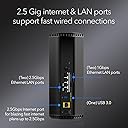
The NETGEAR Nighthawk RS300 WiFi 7 Router delivers ultra-fast wireless speeds up to 9.3Gbps and expansive coverage up to 2,500 sq. ft., supporting 100 devices simultaneously. Equipped with a 2.5 Gigabit internet port and multiple LAN ports, it ensures blazing-fast wired and wireless connections. Enhanced by NETGEAR Armor security and easy management via the Nighthawk app, this sleek, compact router is designed for professionals demanding top-tier performance and protection.
| ASIN | B0D4JBGPH4 |
| Antenna Location | Gaming, House, Professional, Video Games |
| Antenna Type | Fixed |
| Box Contents | One (1) 12V/3.5A Power Adapter, One (1) 2m Ethernet Cable, One (1) WiFi 7 Tri-Band Router (RS300), Quick Start Guide |
| Brand | NETGEAR |
| Brand Name | NETGEAR |
| Colour | black or white |
| Compatible Devices | Gaming Console, Personal Computer, Security Camera, Smart Television, Smartphone |
| Compatible devices | Gaming Console, Personal Computer, Security Camera, Smart Television, Smartphone |
| Connectivity Technology | Ethernet, Wi-Fi |
| Control Method | App |
| Controller Type | App Control |
| Coverage | up to 2,500 sq. ft. |
| Customer Reviews | 4.4 out of 5 stars 641 Reviews |
| Data Transfer Rate | 9.3 Gigabits Per Second |
| Frequency | 6 GHz |
| Frequency Band Class | Tri-Band |
| Frequency band class | Tri-Band |
| Global Trade Identification Number | 00606449169591 |
| Has Internet Connectivity | Yes |
| Has Security Updates | Yes |
| Is Modem Compatible | No |
| LAN Port Bandwidth | 2500, 1000 Mbps |
| Manufacturer | Netgear |
| Manufacturer Part Number | RS300-100NAS |
| Maximum Upstream Data Transfer Rate | 2500 Megabits Per Second |
| Model Name | RS300-100NAS |
| Model Number | RS300-100APS |
| Model name | RS300-100NAS |
| Number of Antennas | 3 |
| Number of Items | 1 |
| Number of Packs | 1 |
| Number of Ports | 4 |
| Operating System | NETGEAR Proprietary OS |
| Other Special Features of the Product | Guest Mode, MU-MIMO, OFDMA, VPN, WPA3 |
| Router Network Type | Tri-Band |
| Security Protocol | WPA3 |
| Special feature | Guest Mode , MU-MIMO, OFDMA, VPN , WPA3 |
| UPC | 606449169591 |
| Unit Count | 1.0 count |
| Voltage | 12 Volts |
| Wireless Compability | 802.11.be |
| Wireless communication standard | 802.11.be |
R**A
Easy Replacement.
All good. Easy network replacement. The only bad thing is that some network items won't work without a dedicated 2.4 dedicated network. My solution was to plug my old router into this new one for just those limited to the slower network and lower security requirements.
N**Y
So Far, So Good
So far, this router has been reliable. It was easy to set up. Signal strength is excellent. The worst thing about it is the flickering indicator LEDs, for which I took off one star from my rating. I wish the lights would stay on without flickering.
D**U
Good router. Annoying limitations of NightHawk mobile app. Older Wifi appliances may have Issues.
So far so good, but not without compatibility issues and annoyances. 1. Basic setup was very easy, but you have to have an active cable modem or other digital service internet connection to setup the router. 2.5 Gb Ethernet RJ-45 interface is there. There are also 2 additional 2.5 Gb RJ-45 internet interfaces plus 2 1 Gb RJ-45 internet interfaces. Annoyance: The Nighthawk phone/ipad app only supports basic setup. If you want to do something like disable SSID broadcast, you need to manually login directly to the router via laptop from a browser. Other routers can be setup without the connection, and then plugged into a live internet connection like a cable router. 2. Some older networked appliance type devices may have WiFi compatibility issues. Example: Older Apple TV boxes like the Generation 2 Apple TV A1469 will hang on initial connection request to the network. You will get to the screen where you can select a network SSID for AppleTV to choose, but it will bomb out with a message: "There was a problem connecting to the internet. The WIFI password entered is not correct. Try Again. (-3900)" - or - "There was a problem connecting to the internet. The WIFI password entered is not correct. Try Again. (-100)" Often this happens before the system has even prompted you to enter in a password. You have only selected the network. This is a modem chip type communications issue which is actually somewhat common with older WiFi devices built to older WiFi specs and newer WiFi6/WiFi6E/WiFi7 routers, not just Apple and not just NETGEAR. One workaround in my case was to DISABLE Access Control on the router and retry setup of the old Apple TV device. This did not work. Another workaround of changing authentication to downgrade WPA2/WPA3 back to WPA2 on the router and retry setup. WPA2 is apparently not always reliably detected by the NETGEAR Router. This did not work, either. Annoyance: The Nighthawk app also is too basic to handle this as well, and info on the WPA settings is not under the SECURITY tab, but under the INFO on the wireless network - but not changeable there. Again, you have to login. Another workaround of disabling all router security also did not work. With some routers it will work, but the older Apple TV boxes will return to an error state of (-100) or (-3900) once security is turned back on. Before you return your router, consider replacing the older devices unless you have no option. In my instance, the Gen 2 Apple TV 1469 box is the only device I have that had connection issues. The device is very old and getting a new one is not that expensive. You may run into similar problems with older Home WiFi appliances adhering to older WiFi specs, even if you replace the router with a different brand. Search their knowledge bases before deciding to return the router and getting something else. Do your research on the device and the specific routers you are looking at, and donโt blindly trust what the router vendor tells you.. Keep in mind that WiFi7 is also still an interim draft specification at this time (January 2025), but it has backwards compatibility. WiFi7 is faster than WiFi6 or 6E, but not much can take advantage of the speed yet. WiFi6 is a released spec. WiFi6E is somewhat proprietary and has no backwards compatibility or limited backwards compatibility, but it is faster than 6. I did, however, still notice a definite improvement in my Internet TV devices on the new NETGEAR RS300 Router.
D**B
Choose right channels
Great as all their products, but it drops off the WiFi signal sometimes.
N**S
RS300 Best Router on the Market!
This router is incredible! The coverage is amazing! The speed is out of this world! The setup was extremely easy! I am so happy with this product and Netgear is an amazing company! I got the RS300 to fix some dead spots in my house and at the same time got such an upgrade to all of my other connections! Such a powerful unit! Would absolutely recommend!
Trustpilot
3 days ago
2 weeks ago