🔥 Elevate your game with OLED brilliance and lightning-fast refresh rates!
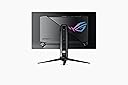
The ASUS ROG Swift PG32UCDP is a 32-inch 4K WOLED gaming monitor featuring a groundbreaking dual-mode refresh rate (4K at 240Hz or FHD at 480Hz), ultra-fast 0.03ms response time, and advanced AI gaming enhancements. Its custom heatsink protects the OLED panel from burn-in, while 99% DCI-P3 color accuracy and a matte anti-glare finish deliver vivid, eye-friendly visuals. With USB-C 90W power delivery and a 3-year warranty, it’s designed for pro gamers and creative professionals seeking top-tier performance and longevity.


| ASIN | B0D7NNK43H |
| Adaptive Sync | FreeSync Premium Pro |
| Additional Features | Blue Light Filter, Eye Care, Flicker-Free, Frameless, OLED |
| Aspect Ratio | 16:9 |
| Best Sellers Rank | #7,217 in Electronics ( See Top 100 in Electronics ) #259 in Computer Monitors |
| Brand | ASUS |
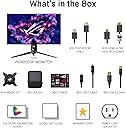
| Built-In Media | DisplayPort cable, HDMI Ultra High Speed Cable, PG32UCDP Gaming monitor, ROG pouch, ROG sticker, USB 3.2 cable |
| Color | BLACK |
| Color Gamut | 100.0 |
| Connectivity Technology | HDMI, DisplayPort, USB-C |
| Contrast Ratio | High |
| Customer Reviews | 4.2 out of 5 stars 257 Reviews |
| Display Resolution Maximum | 3840 x 2160 |
| Display Technology | OLED |
| Display Type | OLED |
| Hardware Connectivity | HDMI |
| Has Color Screen | Yes |
| Image Contrast Ratio | High |
| Item Dimensions D x W x H | 10.8"D x 28.1"W x 22.8"H |
| Item Weight | 16.1 Pounds |
| Manufacturer | ASUS |
| Model Name | PG32UCDP |
| Model Number | PG32UCDP |
| Mounting Type | Wall Mount |
| Native Resolution | 3840x2160 |
| Number of Component Outputs | 1 |
| Picture Quality Enhancement Technology | "Energy Star TÜV Flicker-free TÜV Low Blue Light VESA DisplayHDR 400 True Black Calman Ready" |
| Pixel Pitch | 0.211 |
| Processor Count | 1 |
| Refresh Rate | 240 Hz |
| Resolution | 4K UHD 2160p |
| Response Time | 0.03 Milliseconds |
| Screen Finish | Matte |
| Screen Size | 32 Inches |
| Screen Surface Description | Matte |
| Shape | Flat |
| Specific Uses For Product | Business, Gaming, Photo Video Editing |
| Total Number of HDMI Ports | 2 |
| UPC | 197105416321 |
| Unit Count | 1.0 Count |
| Viewing Angle | 178 Degrees |
| Warranty Description | 3 Year |
| Warranty Type | 3 Years Manufacturer Warranty |
B**.
Wow
This is the best monitor ive ever seen in person, i can hardly believe the clarity. I use it for gaming and desktop apps and it performs like a pro. Yes the price was seriously high, but you get what you pay for. Screen glare is very low so i do not see any reflections from light sources behind me. Setup was easy and the packaging was very good. I used a monitor arm and not the included stand, that was super easy to setup as well. My only complaint is while the monitor controls are very easy to use, the on screen menu is so small on the base resolution it's hard to see/read. But that is no reason not to buy this fantastic monitor. Before i bought this i had read that some people had noticed something around text characters like ghosting, i cannot see anything like this, text seems very clear and crisp. In conclusion, if you have a good pc and want to get the most out of it this monitor is a must have.
F**N
Finally a 4K Monitor That Feels Like Real 4K
Just got it set up and holy crap the blacks are actually black.... like perfect, deep, inky blacks that make everything feel way more vivid. I was this close to going with the 240 Hz glossy version (the UCDM), but I ended up with this one because the matte anti-glare finish was a must for my bright room... and honestly, it was the right call. No glare drama, even with sunlight coming in. This thing is a huge upgrade from my old Dell — like night and day. After using this, my old “4K monitor” feels like it wasn’t really even 4K 😂 Everything is sharper, the colors pop, and motion feels so smooth. If you want deep blacks, great gaming performance, and a killer picture for both work and play, this thing delivers.
C**S
Best display I've owned
To keep it short, I love this display, but it wasn't all peaches and sunshine at the beginning. The listing states this is a frequently returned item, and I almost returned it myself but accidentally figured out what was wrong. It was expensive, I spent more on this monitor than my system, but it's also newer tech, so ok. It works great for games, no ghosting or blurring and black in games in now truly black. The build quality is what it should be at this price point, nothing feels cheap. If you buy this and the screen flickers, try moving anything like a router or modem or anything that's transmitting data away from the monitor. Once I moved the router away, the flickering stopped. Then I turned the router power down and moved it back, the flickering never came back.
E**M
Extremely poor filtering & scaling for an overpriced monitor.
It appears that the PG32UDCP may be using bilinear filtering. Whichever the case is, when gaming in any resolution besides the native 4k resolution, objects can appear fuzzier & blurrier. Enabling Integer Scales helps a little, but is not enough. This inability to sharpen properly like older generations of monitors have is quite unacceptable at this price point. Never had this issue with monitors from five or more years ago. Never had this problem with an Asus PB287Q, for example. Nothing else made this issue any better. Will change the review if they fix this, as others have mentioned it to Asus several times about a year prior since the release of this monitor & seemingly without any progress in regard to this specific issue. Knowing ASUS customer support, which itself is a F for failure, they will likely not make an attempt to resolve this. What happens is that playing in a resolution besides 4k, for example, playing in 1080p & looking at far away objects or text appears blurry & is quite difficult to read. A non-issue on a monitor such as the Asus PG287Q from around 2015, as text at that distance is very clear & readable. And being a video game player who needs to honestly just as clearly see a few yards in front or further in video games, this becomes an annoyance & feels like a downgrade from previous monitor generations. The rest of the monitor, except for the ridiculously foolish AI named & marketed features, looks lovely. Such as the HDR, which Windows operating systems ruin, the brightness which is ruined by Windows operating systems with HDR enabled, & the quite short DisplayPort 1.4 cable & other too short cables that were included. Another thing deserving of a poor review in relation to this monitor is how Asus makes proprietary parts such as the monitor stand itself, & goes on to refuse to sell it separately to anyone who might need it for the same monitor, with or without warranty. This is an obvious attempt to make customers purchase the entire product rather than fix the one they own. ASUS is & has constantly been Anti-consume as Gamers Nexus have repeatedly pointed out & myself have known since I purchased my first products from them over ten years ago, some things just do not change for the better at all.
J**J
Best monitor for gaming
Great monitor. The overall size and screen porpotion is perfect for gaming. Comparing to mywife's 40+" curved display, this monitor has much more useable screen asset when gaming. The performance is exactly what I was looking for: sharp, fast and briliant color and contrast. It comes with a lot of settings for customization and control. Proximity sensor is a nice feature although I have turned it off when gaming to avoid any risk for black screen. The ROG design accent and accessories included are top notch. Highly recommended.
A**N
Visuals
This monitor is absolutely stunning, side to side next to my old one there is zero competition. It is a little bit of a challenge to get the write color settings but worth every second, high quality and bright.
W**Y
A truly visually transformative experience
This review is for the ASUS ROG Swift 32” 4K OLED Gaming Monitor (PG32UCDP) size and version. Absolutely stunning, experience altering is the only way for me to describe this monitor. The combination of OLED, 4k, HDR, and 240hz is the best visual experience so far and truly a visually transformative experience. This monitor is dual mode and has an FHD 480hz mode that I couldn't figure out how to get it to work, but I don't have a "need" for it and won't probably use ever. I think the issue might be related to how my GPU sends a 4k signal even though I set the resolution to 1080p. Since I won't use this feature, I won't be troubleshooting it further. 4k at 240hz is plenty good enough for me in competitive FPS games as a casual player. Playing "CS2" at 4k 240hz on an OLED with HDR enabled felt like seeing a whole new game. Coming from my previous monitor, 4k IPS at 144hz is saying a lot. For open-world triple A games, this OLED monitor is end-game level. I had considered going 1440p ultrawide but after some research found that there was limited game support for that type of resolution and for my use case 4k 32 inch would be a better fit. Do note that I am running this monitor with an RTX 5090 GPU and use my PC for both gaming and desktop work. For desktop work, again this monitor is amazing. With other 4k monitors I have found that at native 4k resolution with 100% scaling my eyes struggled to focus on text, sort of like a camera motor and text appeared to almost vibrate is the only way to describe it. With this Asus PG32UCDP, I see text clearly and my eyes have no problems focusing at native 4K with 100% scaling. At 100% scaling text is tiny but comfortable to view. I use the 4k resolution and 100% scaling all of the time for both gaming and work. Normally with other 4K monitors I have to use 150% scaling. The only downside for me is the default OLED brightness management can be a bit aggressive if you're not used to it. The screen will dim slightly after a few seconds if there is a static image detected. In conclusion, 4k OLED and 32 inch size is optimal for me and is the most visually pleasing and comfortable. This monitor excels in every aspect and is worth the price. The price is high but to me is worth the value. I did buy this monitor on sale during Prime day. I'm not including any pictures because it will not accurately reflect the monitor's performance and experience. Highly recommended if you are in the price range of this monitor and want the best visual experience for both desktop work and gaming.
V**X
Beautiful With PC Crashes
I've been using it only for a little over a day and already encountering issues. When using the Display Port or HDMI with VRR enabled/G-Sync Compatible I experienced PC crash reboot when starting up games. I even cleaned my drivers with DDU and reinstalled the latest NVIDIA game drivers. Finally, I unchecked "Display Specific settings" for G-Sync in NVIDIA Control Panel and this seems to have solved it, allowing G-Sync to work. If G-Sync isn't that important you can easily just turn it completely off. This looks like it may be a software issue on NVIDIA's end rather than a problem with the monitor so I've changed my review from 3/5 to 5/5 because this monitor is beautiful with no pixel or color issues, true black that gives off almost a 3D effect.
D**G
Flikering sin razon, y he intentado todo, pero sigue fallando
Grabé todo desde encendí el PC, y puede ver que se parpadea desde 2:15, flickering demasiado, lo que yo he intentado de solucionar: 1.actualizar al firmeware a 106 ( la version más actualizada a la fecha que subí este video) 2, apagar HEC en OSD 3, apagar VRR 4, cambia a cable que sea de DP o HDMI 5, deja solamente un monitor ( porque tengo otro OLED que esta arrbia G9) despues de investigar no soy único que tenga la situación, busco todas las formas para arreglarlo , y también en Forum de ROG, pero no. cuando se funciona , literalmente es un monitor excelente, pero no se, tengo otro oled de G9 , y nunca me da este problema, no se si me toca mala suerte o trae defecto de fábrica
M**L
افضل استثمار لشاشه
بعد تحربه 11 شهر الشاشه جباره جدا من ناحية الالوان من جودة الفور كي جدا جدا جميله وفيها خاصية 420 هرتز على FHD وعلى الفور كي 240 ماندمت اني اشتريتها وفيها خاصية كل ماتقفل الشاشه تنظف البكسل عشان تمنع التطبع
A**R
Excellent monitor but lacking vibrant colours
This monitor is quite amazing and firmware is top notch. 5 stars but I'm exchanging for UCDM model simply because I can control the ambient light environment to gain better contrast and color levels. I prefer the anti reflection coating this monitor has and HDR looks great and handles dark scenes with zero OLED flicker. My only concern is that the colours just didn't hit the mark for me which is pretty much the only drawback I could find with this product. Pros: - Handles bright ambient room light very well -No OLED flicker that I could notice when using in dark scenes when using variable refresh rate -Dual mode function for 1080p in FPS games -HDR in supported games amazing. -Super high peak brightness Cons: -Frequently selling above MSRP for whatever reason -HDR didn't hit the mark on unsupported games and further desaturated colors. (Disabling HDR mostly fixed this) -Colour aren't as vibrant and noticeably lacking compared to cheaper high quality IPS gaming monitors.
M**Z
Incredible Monitor - One of the Best Monitors I've Ever Used
I've been using the PG32UCDP for a few weeks now, and honestly, it's incredible. The WOLED panel is stunning, rich, vibrant colours, perfect blacks, and insane contrast. Everything from games to movies looks amazing. I was debating between this monitor and the QD-OLED PG32UCDM, and I'm really glad I went with this one. Everything looks crisp, whether I'm gaming, watching movies, or just browsing. The dual-mode feature is awesome. I haven't really used it much yet, but I love having the option to switch between 4K at 240Hz for gorgeous visuals and 1080p at 480Hz for ultra-smooth, super responsive gameplay. It's like having two monitors in one. Build quality is excellent too. The stand is solid, though I've mounted mine on a monitor arm for easier movement. The design is clean, and it has all the ports I could ask for. The KVM switch and USB-C with 90W charging are great bonuses (I keep it at 65W to maintain max brightness), and they make my setup super clean and efficient. Yes, it's pricey, but honestly? Worth every penny. It's made everything I do on my PC feel more premium and immersive. If you're on the fence, just go for it. You won't regret it.
ع**ي
انصحكم فيها
تاريخيه
Trustpilot
1 month ago
1 week ago