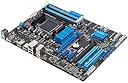
🚀 Unlock powerhouse performance & smart control — the motherboard that means business.
The ASUS M5A97 LE R2.0 motherboard combines AMD 970 chipset support for AM3+ 8-core processors with exclusive ASUS Dual Intelligent Processor technology, delivering optimized power efficiency and performance scaling. Featuring USB 3.0 Boost with UASP for up to 170% faster data transfer, real-time Network iControl bandwidth management, and DirectKey BIOS access, it’s engineered for professionals seeking reliable, future-proof computing with easy overclocking and robust connectivity.
| ASIN | B008RPZ5SC |
| Best Sellers Rank | #410 in Computer Motherboards |
| Brand | ASUS |
| CPU Model | FX-Series Eight-Core FX-8120 |
| CPU Socket | Socket AM3+ |
| Chipset Type | AMD 970 |
| Compatible Devices | Personal Computer |
| Compatible Processors | Socket AM3+ |
| Customer Reviews | 4.4 out of 5 stars 1,539 Reviews |
| Global Trade Identification Number | 00610839188499, 04719543188491 |
| Graphics Card Interface | AGP, Integrated |
| Item Weight | 3 Pounds |
| Main Power Connector Type | ATX |
| Manufacturer | ASUS Computer International Direct |
| Memory Clock Speed | 1333 MHz |
| Memory Slots Available | 4 |
| Memory Storage Capacity | 32 GB |
| Model Name | FBA_M5A97 LE R2.0 |
| Model Number | M5A97 LE R2.0 |
| Number of Ethernet Ports | 1 |
| Number of Ports | 13 |
| Platform | Windows |
| Processor Socket | Socket AM3+ |
| RAM Memory Technology | DDR3 |
| Ram Memory Maximum Size | 32 GB |
| S/PDIF Connector Type | Optical |
| System Bus Standard Supported | SATA 3 |
| Total PCIe Ports | 4 |
| Total SATA Ports | 6 |
| Total Usb Ports | 11 |
| UPC | 610839188499 |
| USB 2.0 | 6 |
L**R
Excellent board for the price.
If you are looking for a great bang for your buck, I highly recommend this board. I recently "refreshed" my computer because of a motherboard failure (Gigabyte.. you let me down). I popped in an FX-8320 and 8 GB of Corsair Vengeance ram. Here is the link to the ram I used that works flawlessly with the board: ( Corsair Vengeance 8 GB ( 2 x 4 GB ) DDR3 1600 MHz (PC3 12800) 240-Pin DDR3 Memory Kit for Core i3, i5, i7 and Platforms SDRAM CMZ8GX3M2A1600C9 Just manually change Bios settings to "1600 MHz" and it automatically does the rest without worrying. I was worried about the board not booting because of the new FX-8320 processor. My bios was the older one that did not "support" the newer processor. However, the board booted and recognized the CPU on the first try. Not wanting to tempt fate, I loaded the newest bios drivers from Asus onto a USB flash drive and flashed the bios. The bios is very easy to navigate and you can use a mouse in it. The bios flash was painless and I was off and running. I loaded Win 7 onto it, and since I had previously had Win 7 on my Intel 330 SSD I tried to install it after formatting it through the Win 7 installation processor. Win 7 kept giving me an EFI error (something about my HD being formatted improperly for EFI). I almost decided to throw the CPU away at that point, but a quick look at the Bios settings, I turned off "Secure Boot" (I believe this is a Win 8 mandatory thing). After turning off Secure Boot everything went flawlessly. The only funny thing was Win 7 didn't automatically install drivers for the onboard NIC and I had to install the drivers which is the first time in many builds that has ever happened to me. Using this board for about 2 weeks now I cannot say enough good things about it. Absolutely rock solid, no issues or hangups. Motherboard runs cold for me and has enough goodies that I am impressed. I'd used Gigabyte for a few builds and after it failed I decided to change up to Asus. I'm very pleased with this board and if it holds up I'll always purchase Asus boards from now on. Side note, on my USB Logitech G35's I was plagued with the awful popping when playing music and was pulling my hair out trying to stop it on my previous Gigabyte board (I think it was a 770 version). I tried everything and just decided to get used to it. With this new board there is absolutely no popping whatsoever so a nice surprise there! Full specs: FX-8320 M5A97 R2.0 AM3+ board 8 GB Corsair Vengeance 1600 DDR3 Corsair TX-650 Sapphire Vapor-X HD-5770 (Just ordered a Sapphire HD-7870, so hopefully it works just as good!) Intel 330 SSD 128 GB Toshiba DVD burner 3 Western Digital 500 GB HDs **UPDATE 12/2/2013** This motherboard has been absolutely great for me and I've been very pleased with it. I upgraded my CPU cooler from the Coolermaster Hyper 212+ to the Corsair H80 and worked around my cooling situation in my Antec 300 case with some great new fans including an Antec Spot fan directly onto my socket/VRM area. I've sort of reached a point where I can no longer increase my overclock because the motherboard(and my CPU) aren't allowing me to go any higher. Even with great thermals, I worry a little pushing this board really hard. Don't let that discourage you though, this is arguably one of the best "budget" motherboard's I've ever had. Since I've had a difficult time finding settings that work for OC'ing on this motherboard, I'll lay a few out to give anyone who is interested a starting point. I've seen people say this board will crash, burn, and melt when OC'ing so I'll sort of dispel that here. **(Obviously, overclocking your computer is at your own risk. You void warranties and risk damaging components by doing this! Please don't emulate me unless you are truly okay with any kinds of negative or positive consequences that may come about) ** My settings for a decent overclock: Ai overclock tuner: Manual CPU Ratio: 22.0 AMD turbo core: disabled CPU bus frequency: auto Memory frequency: 1600 CPU/NB frequency: 2200 HT: 2400 PCIE spread and CPU spread spectrum both disabled CPU LLC: Enabled Northbridge/cpu LLC: Auto Adjust CPU voltage manually CPU voltage: 1.4125 Everything else set to auto. All C6/HPC/APM disabled. A manual CPU voltage of 1.4125 with LLC enabled on this board will shoot your voltage up around 1.44 or so under load with this board so be aware of the thermal commitment/power usage of that. Also, I chose to cool my VRM/socket area with the Antec Spot Cool just to be on the safe side messing with the voltages. Also, Cool & Quiet cannot be enabled when you manually adjust CPU voltages on this board (I don't really understand why). Thus, your CPU will run at full voltage regardless of load. Using my H80 the socket temperature is around 35C completely idle. Under full bore load (OCCT), I'm running about 60 C on my CPU socket and 47C on my cores. A better quality board would keep the CPU socket temperature closer to the cores, but you will pay double the price for that. The thermal limits on the FX-8320/83250 is 62C on the cores and 72C on the CPU socket. All the processors that you buy are subject to the "silicone lottery" which means some will be great overclockers and some will be terrible. These are my settings for 4.4GHz on 8 cores running stable, so yes you can OC this board and it is pretty decent at it. If you want to push your chip any harder you're probably looking at the wrong board (I would steer you towards the Asus Crosshair Formula or Asus Sabertooth motherboards)
J**R
Asus M5A97 R2.0 Motherboard
Before I begin I would like to point out that if you are planning to buy a motherboard, or any other major purchase, it is wise to go to the manufacturer’s website and do some research. This might even cut down on negative reviews. I downloaded the manual and Quality Vendors List (QVL) from Asus ([...]) to see which CPUs and Memory that was compatible with this motherboard. Also available at the website are the latest drivers and BIOS, a short video on how to use Bios Flashback to update Bios, and much more information. Now I would like to address some of the negative and less favorable comments/reviews I have read: 1) No IEEE-1394 connectors or headers: The specifications say nothing about IEEE-1394 support but reading the manual there is a statement that trying to plug an IEEE-1394 connector into a USB header will damage the motherboard. 2) No USB 3.0 front panel header: It is in the manual, shows up on the motherboard diagrams and I visibly see it and clearly labeled. 3) Back plate for case does not align with motherboard: I had this same problem but after replacing the six brass standoffs on my case with taller ones everything aligned perfect. This seems like a case issue and not a motherboard issue. 4) No SLI support: The manual does say it only supports CrossoverX, with the crossover cable or via software. One of the things I like about this motherboard is the Bios Flashback button on the board. I ordered this mother board on a Wednesday and received it on Friday, but no CPU yet. I installed the motherboard in the case, formatted a USB thumb drive to Fat32 (on my laptop), renamed and copied the Bios update file to the thumb drive, plugged the thumb drive into the designated USB port, applied power to the motherboard, pressed the Bios Flashback button and after a few moments the bios was updated – No CPU or memory installed and Bios still updated. So I know if I ever mess up the bios I will be able to easily recover my bios. I also read you can even backup and save your Bios settings for the very purpose of recovery. The 6 Sata ports are located out of the way and don’t interfere with anything, actually the motherboard is laid out to make it easy to install most peripherals without interfering with anything else. There is one exception, I installed an Radeon HD6670 graphics card in the first PCIe x16 slot and the card does cover one of the PCIe x1 slots. I originally downloaded the updated drivers and software from Asus but I ended up installing the drivers and software form the included CD then used the Asus EZ update to update the drivers. This was far better way than my first attempt at using the downloaded drivers. Bottom line, this is an excellent motherboard for the price if not the best in this price range. It supports many of the AMD CPUs including the AMD FX-8120 I ordered for this board. The UEFI bios is extremely easy to navigated and adjust. The included driver and software disk includes very useful software, I like the Ai Suite, it even has an auto tune function to safely overclock the CPU and memory. I highly recommend this motherboard. The following are the parts I ordered for the build and they all work well together. Keep in mind that the motherboard only comes with 2 Sata III cables. AMD FX-8120 8-Core Black Edition Processor Socket AM3+ - FD8120FRGUBOX Cooler Master Hyper TX3 - CPU Cooler with 3 Direct Contact Heat Pipes (RR-910-HTX3-G1) Cooler Master BladeMaster 92mm PWM High Air Flow Silent Case Fan R4-BM9S-28PK-R0 (second fan for CPU cooler – push pull configuration) PWM Y Splitter Cable Adapter (for dual CPU fan setup) Corsair Vengeance Blue 8 GB (2X4 GB) PC3-12800 1600mHz DDR3 240-Pin SDRAM Dual Channel Memory Kit CMZ8GX3M2A1600C9B Sapphire Radeon HD 6670 1GB DDR3 HDMI/DVI-D/VGA PCI-Express Graphics Card (11192-22-20G) Corsair Builder Series CX 500 Watt ATX/EPS 80 PLUS (CX500)
B**7
Very good AMD board, Great Budget board.
**** This is a VERY solid board for light gaming. No SLI or Crossfire as the second Express slot is not an x16, but x4. Still, bought this for use with a FX6300 chip and a older ATI HD 4870, installed 8G memory on it and it's been very solid and runs pretty coon with only slight overclocking. But it is used to play a lot of World of Warcraft (legion), Minecraft, Stellaris, and a few other Steam games with no problem. Windows 10 Pro runs excellent, games are good FPS, and it does all I need it for. **** I have only ONE real complaint, but I knew coming in that this has NO USB 3.0 header built on the MB. It DOES have two 3.0 jacks, but would have liked to use the USB 3.0 front side plugs on the case. Might buy a separate card for that connector. It's really a minor issue for me though. **** I would NOT recommend this for a "Hard Care" gamer, but it's a solid inexpensive motherboard for the casual gamer or for almost any other use. This is my THIRD ASUS motherboard in the house and they all are very reliable. (I love AMD for the great price/power factor.) I have built several others for friends and family and no one has had any MB issues with the ASUS boards used. **** If you are a budget builder, this is a great option!
S**R
Decent Board, But Not Great For FX Series CPUs
I bought this board as a replacement for an M5A97 PLUS I had for about a year. The old board's VRM had gone a bit wonky after a series of power outages occurred about six months ago in my area, often making power fluctuate throughout the board, and when I got this board as a replacement I didn't think to consider the design of the VRM as a possible cause of my earlier problems, so that's obviously on me for not doing proper research. I came to the conclusion that the problems were VRM related because various parts would randomly fail, drives would just stop working out of the blue, and no matter what I did, I couldn't fix it. I replaced the power supply twice, the RAM twice, the various drives multiple times, and every test I did on the various components came back with a clean bill of health for them. Drives are all good, RAM is all good, GPU's are all good, and so on. This board is slightly more deluxe than the PLUS model, however there is still no heatsink on the VRM, and the VRM itself is located right against the CPU. I'm sure for a cooler-running chip like an Athlon II it wouldn't be that big of a problem, but with my FX-8350, it proved to have many of the same problems that the PLUS board did after the power outages occurred. The only difference here is that the problems cropped up with the LE immediately instead of waiting for four power outages to occur in the space of one week before it happened. Maybe this has something to do with the added features or something, I don't know. But what I do know is that there is essentially and thermally no difference at all between the VRM on the LE and the VRM on the PLUS, and since it sits right up against the CPU socket and most CPU fans will blow the hot air from the CPU over that part of the board for exhaust, it's going to make the VRM hotter than it really needs to be. On a whim the other day, I did some searching online for "M5A97 FX Unstable" and found that the thermal design and the lack of a good heatsink on the VRM on these boards, as well as the BIOS and some of the hardware specifications, this series of boards has compatibility problems with newer chips like the FX Vishera. Like I said, the board itself seems solid enough, but if you're planning to build a rig with a higher-end CPU, I'd suggest passing on this model and indeed the entire M5A97 series.
P**Y
MB that seems to work just fine and good price point
Have used ASUS for sometime, different HW. I've been buidling my own systems since '94 and I do work in IT. Are there better boards? - yes of course, almost always there are better but may also cost more or not work with some of your existing HW. Now I purchased this board to replace my old MB that has had some issues for the past year (4yrs old btw - my system is almost always on sans PWR fail) and finally passed on. Also because my CPU would fit - here I did make a mistake thinking that I had an AMD Quad Core, having forgot that I had AMD Triple Core that the old MB allowed the 4th core unlock and was stable. This MB does not unlock the 4th core. So sadly I was reduced to 3xCore and as stated - sad :( This promptly made me purchase a new Octo Core processor :). Also had to purchase new memory as old MB was DDR2 - this is DDR3, fine upgraded from 8GB to 16GB, made me more :). MB itself seems to work just fine. CPU works well, RAM works well, my 4xSATA HDD all attached, recognized and booted to Win7 64 ultimate no issues, 2xSATA optical drives (DVD burner/BR Burner) working fine, I don't use onboard video unless I have to - old nVidia 9600GT 1GB still working fine (need to upgrade it soon :)) ) plugged in and worked fine, i80 watercooler fit, but I do have a large case so not much worries about fitting things in anyway. USB ports all are good to go, 3.0 working well. The only 2 issues I ran into - 1) Some of the asus MB software, ai suite and some others - nothing really detrimental - wouldn't update/install. 2) the onboard sound ended up being sucky. Normally not a stickler on sound, video more important normally for me - but sound a bit staticy, do voice chat - mic was causing a good amount of static. Happened from rear or front jacks - front jacks even more so but that is case issue not necessarily the built in sound as I verified later. Did purchase a Xonar Sound Card (had a good deal) that worked almost perfectly - front jacks still a bit sucky. Rear jacks nearly perfect - the rest would then fall to the spearkers themselves. Otherwise recommended purchase. If you care at all about sound or do voice chat for gaming etc then you probably want an addon sound card - then again you probably already have one.
R**D
Great cheap motherboard
Before I start my 5 star review, I would like to address how long it took to get this item shipped to me. It was in preparing shipment for a week, and I had already received all my other parts for my build but this item. So it was agonizing waiting for this item to finally come in. Also after ordering, I decided to read the 1 star reviews, and man did it worry me. DOA's left and right. Luckily... the one i received wasn't a DOA. The MOBO is great! Quick boot up times. The UEFI thingy is awesome. New to me, but awesome, and I hate change. USB 3.0 headers, which is another awesome thing to have at this cost range. Just awesome. My Budget build: -Corsair Carbide Series SPEC-02 Mid Tower Gaming Case (CC-9011051-WW) -Rosewill 750W 80 PLUS BRONZE Certified Power Supply Hive-750 -AMD FD6350FRHKBOX FX-6350 FX-Series 6-Core Black Edition -Edimax 300 Mbps Wireless 802.11b/g/n PCI Express Adapter (EW-7612PIn) - Asus Black 12X BD-ROM 16X DVD-ROM 48X CD-ROM SATA Internal Blu-Ray Drive (BC-12B1ST) -Kingston Digital 60 GB SSDNow KC300 SATA 3 2.5-Inch Solid State Drive with Adapter SKC300S37A/60G - Sapphire Radeon R9 270X 4GB GDDR5 Dual-X with Boost and OC version 11217-04-20G (2X) -TOSHIBA DT01ACA100 1TB 7200 RPM 32MB Cache SATA 6.0Gb/s 3.5 Internal Hard Drive - G.SKILL 8GB (2 x 4GB) Ripjaws X Series DDR3 1600MHz F3-12800CL8D-8GBXM -NZXT SENTRY 2 Accessories 5.25-Inch Touch Screen Fan Controller (Black) -Cooler Master SickleFlow 120 - (3x) the build up there works perfectly fine for me and nets a little over a grand.
A**M
Great board, great price
It's only the first day since I got this setup and running, but I figured I would share anyway. This was my first PC build, and it worked like a charm out of the box. The only issue I had was that the plugin for the POST speaker on the case wasn't compatible. (Cougar Solution Case) Also I had some errors installing .Net Framework v4.0 (I think this is required for the included software), but I think this was from installing drivers in the wrong order, and was quickly remedied. So far I am very impressed - the included software is very nice for monitoring and making changes. I have not tried the overclocking capabilities yet, (Need more cooling power) but they look promising. All in all, I have no complaints. This is a great feature-packed board for a low price. Update 12/21/2016: This thing is still going strong. I've had a couple issues with various USB headers, but there are enough of them on the board that it wasn't an issue to just plug devices into other ports. I think now there are better boards out there, but this one still works well for cheap builds. Only reason I may swap this out soon is to move to the new AM4 CPU's. Also, I wish the PCI slots were 3.0. The 2.0 slot works fine, but I think it will bottleneck if I upgrade my current GPU from the aging HD-7850.
J**.
I Paired this mobo with an FX6300 and it runs like a beast
This motherboard is a great for overclocking and it comes with lots of features. I own an ASUS z87 board for my Computer and I couldn't be happier with it. So I decided that this would be a great motherboard to go with my brother's computer given the remarkable quality and features that ASUS brings. I Love the UEFI BIOS and its nearly identical to mine so i already knew everything in the bios so setting up the computer was a breeze. I paired it up with a FX6300 because this was a budget build for my brother since it was coming out of my pocket and I didn't want to spend a lot of money. I put this in a NZXT source 210 black window edition and it looks really nice. I left the stock cooler on so he could decide what CPU cooler he wanted to install and I also paired it with my old 500GB HDD and my old XFX 7750 that still plays games really well at 1080P with medium to high settings at 30FPS or more. I heard this mobo also supports an 8350 with no problems but I decided to use the 6300 beause it was on sale for only 110 dollars!I highly Recommend this product to anyone with an FX series processor.
Trustpilot
1 month ago
2 weeks ago