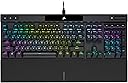
โจ๏ธ Elevate your desk game with precision, speed, and style!
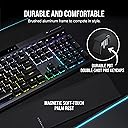
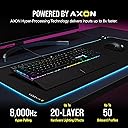
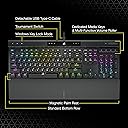
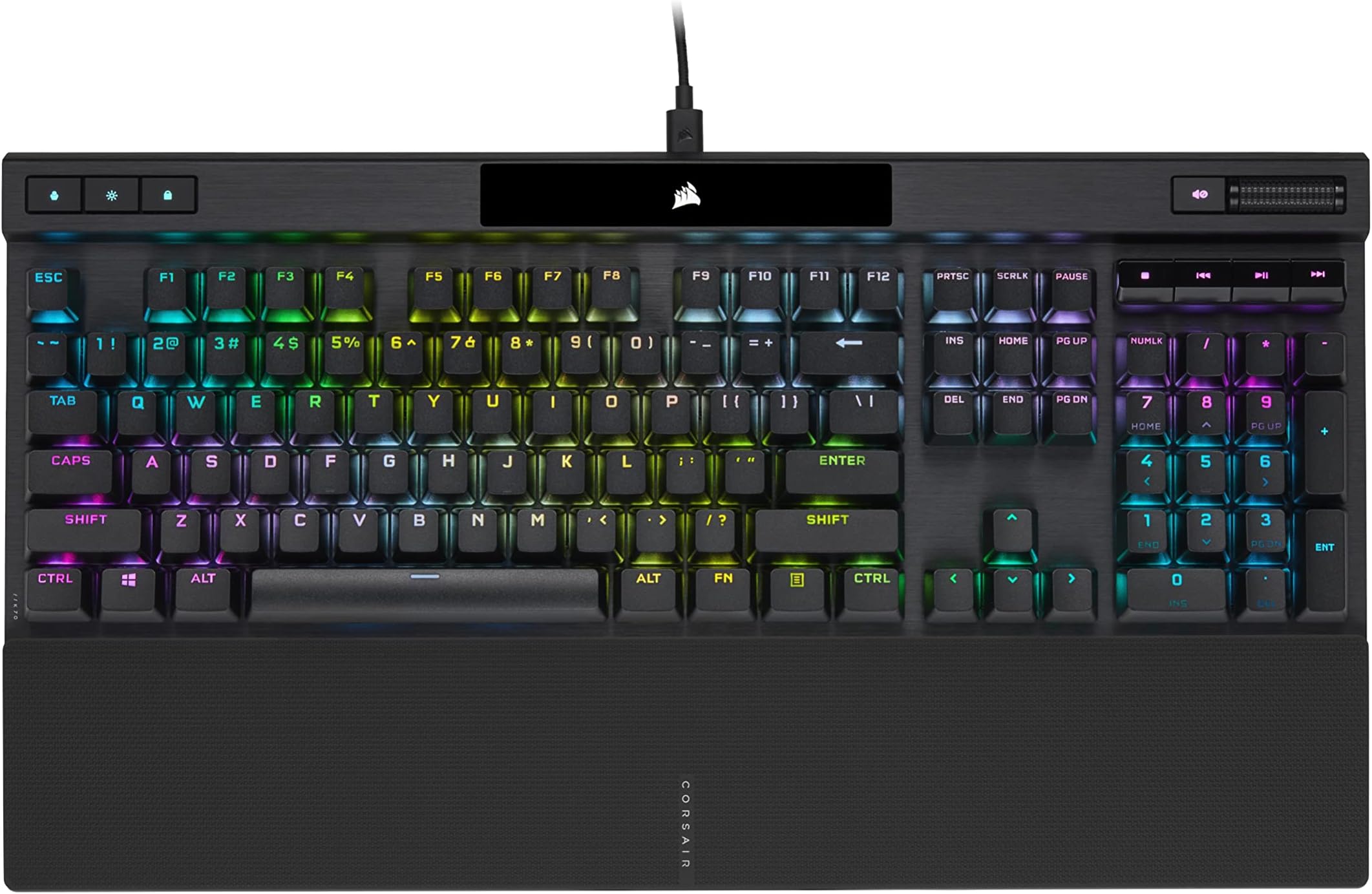
The Corsair K70 RGB PRO Mechanical Keyboard redefines performance with 8,000Hz hyper-polling powered by AXON technology, Cherry MX Brown tactile switches rated for 100 million keystrokes, and durable PBT double-shot keycaps. Designed for professionals and gamers alike, it features customizable per-key RGB lighting, a detachable braided USB-C cable for portability, and an ergonomic magnetic palm rest. Compatible across PC, Mac, and Xbox, itโs built to deliver precision, durability, and sleek aesthetics that fit seamlessly into any high-performance workspace.


| ASIN | B09NMM4FY6 |
| Additional Features | Backlit, Hotkeys and Media Keys, Volume Roller, Wrist Rest |
| Antenna Location | Gaming |
| Best Sellers Rank | #11,145 in Video Games ( See Top 100 in Video Games ) #753 in PC Gaming Keyboards |
| Brand | Corsair |
| Built-In Media | USB Cable |
| Button Quantity | 104 |
| Color | Black |
| Compatible Devices | Gaming Console |
| Compatible Operating System Family | MacOS, Windows |
| Connectivity Technology | USB-A , USB-C |
| Customer Reviews | 4.3 out of 5 stars 453 Reviews |
| Enclosure Material | Aluminum, Plastic, Polycarbonate |
| Hand Orientation | Ambidextrous |
| Item Dimensions L x W x H | 17.5"L x 6.54"W x 1.58"H |
| Item Weight | 2.5 Pounds |
| Keyboard Backlighting Color Support | RGB |
| Keyboard Description | Gaming |
| Keyboard Layout | QWERTY |
| Language | English |
| Manufacturer | Corsair |
| Mechanical Keyboard Switch Model | cherry_mx_rgb_brown |
| Mfr Part Number | CH-9109412-NA |
| Model Name | K70 RGB PRO |
| Model Number | CH-9109412-NA |
| Number of Keys | 104 |
| Number of Sections | 2 |
| Power Source | Corded Electric |
| Recommended Uses For Product | Gaming |
| Series Number | 9109412 |
| Special Feature | Backlit, Hotkeys and Media Keys , Volume Roller, Wrist Rest |
| Style Name | K70 RGB PRO |
| Switch Type | Tactile |
| UPC | 840006645993 |
| Unit Count | 1.0 Count |
| Warranty Description | 2 year manufacturer |
J**E
Great product at a great price. Well done again, Corsair!
This is my 3rd mechanical kb. The first one is a Ducky One non-rbg with Cherry Browns. I fell in love with the Browns on that board. My 2nd is the Corsair K70 RGB Mk. 2 Rapidfire with Cherry Speed Switches. I've had it for 4 years and never really got used to those switches requiring such little force to actuate. This causes me to suddenly fall off high places or crash in games. I wanted Browns on that board, but the price is just too high at $250. Why? Browns don't cost nearly that much. Cost with the Speed switches was $125, so it was a no-brainer at the time. Little did I know how sensitive those switches are. This new kb, the Corsair K70 RGB Pro with Cherry Browns, was on sale for $99, so I jumped on it. And boy did I miss these switches. They feel so good to me without being too loud, and it sounds better than my Ducky One. This kb is near identical with the Mk 2 Rapidfire, but it has 6 brightness settings, no usb pass-through (which I never used anyway), and 8mb onboard ram. It does not come with any color profiles onboard, and the default color for all lights is white. I'm not sure how many profiles it can store, I guess it depends on how complicated they are. I only use 1. It also comes with a nice braided USB A to C cable, black in color. The 3 top left lights can't be color changed, but if you set brightness to off, the middle light turns off and the other 2 will dim.. I just got the kb a few hours ago, so time till tell how well it holds up, but if my Mk. 2 Rapidfire is any indication of build quality, it's going to last for many years. Both boards are pretty heavy and solid. I'm very happy with it, but Corsair really needs to work on improving iCue. It was horrible 4 years ago and it still is. I do wish Corsair would pre-lube the switches though.Sure it would increase the prices a bit, but it would be well worth it. I looked into lubing the switches on the Mk.2 Rapidfire a few years ago and the folks on r/mechanicalkeyboards say because of Corsair keyboards using plate mounted switches, I would have to desolder each and every switch to open them and add lube. I'm not doing that. Overall I'm happy with Corsair keyboards and ram, which I've been using for years now and never had a problem. Edit: I've discovered this kb needs a USB 3.1 port. If you use a 2.0 port, you will have random disconnects.
B**F
The best keyboard I have ever owned (... and I've owned/used lots of them)
I am Electrical Engineer, and have been working in the computer and chip design industry using computers on a daily basis for over 45 years, and this is by far the best keyboard that I have ever used, period. If I had to use one word to describe this keyboard it would be "SOLID". It's a very sturdily built keyboard, so make sure you have a robust desk to hold it. The mechanical MX Brown Keys switches are just "perfect". They feel and sound great, and provide excellent tactile keypress feedback. I have recently tried keyboards that use membrane switches, which felt dead and numb in comparison. I don't think that I can ever return to a membrane switch type of keyboard. These mechanical key switches really do make a BIG difference. There is a much better feel when typing on these PBT key caps vs the usual ABS key caps. The surface of the keycaps is slightly textured which have improved my typing ability. As a plus, the PBT keycaps are sturdier, longer lasting and will not exhibit the well known ABS key cap "shine" that develops over time. The K70 RGB Pro keyboard lighting is just right for my requirements. I just want to clearly see the keys in the dark, so using a static color works best for me. I do not need lighting zones, or fancy lighting effects, and as such I did not download or use the iCUE software used to do this. The very nice thing about the K70 RGB Pro keyboard is that you can control the basic lighting effects (minus the real fancy ones you need the iCUE software for) on the keyboard itself just using the Fn key. Even in max lighting setting, the K70 RGB Pro keyboard lighting is subtle and does not blind you like some of the other recent keyboards that I have tried. The angle profile of the keyboard is also ideal, not too low or too high, it is just at the right angle with the feet swung out. I need my keyboards to have a palm rest, and so I was concerned as to the stability of the detachable one on the K70 RGB Pro. The palm rest magnetically snaps to the keyboard, and there are two mechanical plastic tabs that keep the palm rest from moving from side to side relative to the keyboard. This results in a very solid palm rest that seems to be built right into the keyboard. The surface of the palm rest is not smooth but textured which makes it much easier to use. The palm rest is hard plastic and not soft padded. I personally prefer that since I think the surface of a soft padded palm rest would eventually crack and break. I am not a fan, and never use the "Windows" key on a keyboard. On past keyboards I have been frustrated by the occasional accidental pressing of this key when trying to hit the "CTRL" or "ALT" keys around it. The K70 RGB Pro keyboard has a "LOCK" function key that is used to disable the "Windows" key which works perfectly. So the accidental "Windows" keypresses no longer happen when using my computer with this keyboard. Another key that I will occasionally accidentally press is the "CAPS LOCK" key. On the K70 RGB Pro this results in a nice bright white "A" light getting lit on the top status panel. Other keyboards I have tried just lit a round LED sometimes hidden just above the arrow keys on the bottom left side, which made it hard to notice. The only negative I have with the K70 RGB Pro is that I wished they had made the "A" light just a tad larger and red so it would be impossible to miss. The audio control buttons on the upper right side of the keyboard are just your basic media buttons, which is all I need. The most important ones are the mute and volume scroll wheel which work just fine. The K70 RGB Pro has three additional features that I do not use: 1) keyboard macro recording, 2) a tournament switch, and 3) a removable USB cable. Perhaps I'll find a use for these features somewhere down the line. Before settling on the Corsair K70 RGB Pro, I recently tried and returned the Razer Black Widow V3 and Razer Ornata V3 keyboards. The Black Widow keyboard had mechanical switches but they were very sensitive, the palm rest tended to slide sideways, the lighting was very intense, and the key cap surface felt way too high for my taste. The Ornata uses membrane switches which felt completely dead and offered no tactile feedback, the palm rest also liked to slide sideways, and there seemed to be a sea of background light surrounding the keys, which again was way brighter than what I was looking for. I found that I made a lot of typing errors on these keyboards when compared to my old Logitech G213 keyboard. In conclusion, the K70 RGB Pro is a well built keyboard that seems to check all the right points. It even helps to make this poor typist feel like he's a world class typist.
H**E
Great keyboard
Good gaming keyboard
D**N
My new fav. Full size with small footprint. Absurd amount of customization.
Part of me wanted to get the newer MAX model. But the gaudy aesthetics turned me off. I'm glad I didn't and saved some money. This keyboard is absolutely amazing! I thought it was going to be huge looking at the pictures, but it's smaller than my old Gskill KM570 keyboard. Keys are somewhat small, so if you're use to typing with large keycaps, it will be a little getting use to. The backlighting is nice and bright with 5 levels. And unlike what I've seen in review videos, lighting come through All letters and symbols. I guess Corsair corrected this? Nice. Typing feels amazing (MX brown). Not as clackly or as loud as i'd like, but it's fine. (I just like really loud keyboards). BUT the best thing about this thing is the software and lighting effects. oh dear lord. The iCue software lets you fully customize every key and the buttons at the top and the logo. You can layer effects on top of each other and it has memory. So you can save lighting effects and switch to them on the fly. BTW the space bar has 3 lighting zones and the logo has 2. Not just one. Volume roller is nice and smooth and i like that it has a detachable USB-C to A cable. Overall I love this keyboard and I doubt you'll find anything better for this price or even from the $300 ones.
D**N
Great keyboard with a fatal flaw.
I've been using this keyboard for a year now. I can't recommend it purely because of it's USB c connection. Because it's removable may be great but for actual gamers it's unusable. The connection fails randomly every two seconds every 5 minutes or so. This is unacceptable, I've had it disconnect during a 1v1 in fortnite for no reason and then lose the entire match. This issue is in every game on my computer, some games it disconnects and acts as if the key is held until it disconnects again. This is too annoying to use as a real keyboard. The software works well it looks cool. Because of it disconnect it makes it unusable. Its very loud with the blue switches. it has punctual keys. No lag until it disconnects then I can die mid game because of it. It feels fine.
M**N
Everything but the Volume Controller is great.
This keyboard is sick. Super customizable. The only reason its 4 stars and not 5 is the Volume Roller on the top right. It simply does not work. I've messed with every sensitivity and input setting possible. Its definitely a hardware issue. If you roll the volume control up or down, it will just bounce you back and forth between top volume and maybe 97. Luckily this isn't a huge issue for me because my computer speakers are not a far reach, they also have a remote which lives next to the keyboard on my desk anyway. And of course, there's the old-fashioned way of changing volume on the task bar so I deal with it. Its just a bit of a downer for such an expensive keyboard with such a useful feature to have it not work.
R**.
Corsair K70 RGB Pro w/ MX Cherry Brown switches
This keyboard is righteous to say the least. I know this is a "gamer" keyboard but I bought it for work. I looked at a huge amount of reviews about this keyboard and the first version I purchased was with MX Cherry Silver switches and it was a total gamer keyboard. The switches were just too sensitive for the amount of typing I do an bought it for. The Brown switches were the ticket. Sensitive enough so you don't need to apply a lot of pressure and the keys are nice and firm yet not tough to press. The aluminum chassis plus these keys gives you that almost clickable key sound from the 486DX computers but with no clicky feel. If you are needing a silent keyboard to respect the people around you, you might want check other MX Cherry switches. If you want to know how this sounds, watch the movie Wargames or the show NCIS (with Mark Harmon), the sounds of people typing on their keyboards pretty much explains exactly what this keyboard sounds like when you type on it. The RGB lighting is freaking awesome. You will need to download the iCUE software from Corsair. This will let you configure the different aspects of the keyboard (lighting, key configurations, key blocking, etc.). This keyboard is GREAT! The price has been slashed to $99 last I looked and it is absolutely worth it.
T**T
Great product, do not use iCUE rgb software
The product is gret, works amazing. Just do not use iCUE software to change the rbg settings as it is very buggy. Use FN+1-10 for RBG directly on keyboard. The software recently had an issue of altering your mouse speed and acceleration on windows startup. If you care only for the keyboard then its a good buy, the RBG customization software is a joke. Just check the Corsair Reddit to see what people have to say about it
G**.
Excelente compra
Buenisimo, me encanto. Creo que ya encontre un teclado favorito.
H**L
Corsair 5 stars
Corsair best keyboard!
S**R
High-quality. Ignore reviews and judge for yourself.
Probably the nicest keyboard I have ever owned. The lighting is SICK! And unlike past iterations, of cosair keyboard software, it does come with basic presets, so you don't have to be an engineer in order to make it look cool out of the box. The keys feel amazing. I have seen reviews critisizing the plasticky sound of actuation. As long as you're not hammering on the keys all the time, you probably won't notice this. The detachable USB type C are both convenient and ensure longevity of the keyboard overall. It's great for gaming and amazing for typing. Get one!
R**Y
High-Performance Keyboard with Premium Feel
Responsive keys with satisfying feedback make typing and gaming feel great. The build quality is solid, and the RGB lighting is vibrant and customizable. Comfortable for long sessions, though itโs on the pricier side. A reliable choice if you want performance and durability.
A**T
A great keyboard with great switches!
Very good, love the brown switches and the RGB along with the brightness is good. I can sync the RGB lights using Corsair icue and this keyboard also supports 8000 Hz polling rate which is cherry on the cake. The wrist rest is also magnetic, something that Razer still doesn't offer. Overall, Corsair is way better than Razer. Go for it if you like tactile mechanical switches especially brown. These are the best switches out there for both typing and gaming.
Trustpilot
2 weeks ago
3 weeks ago