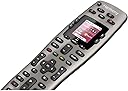
🎯 Master your media kingdom with Harmony 650 — one remote to rule them all!
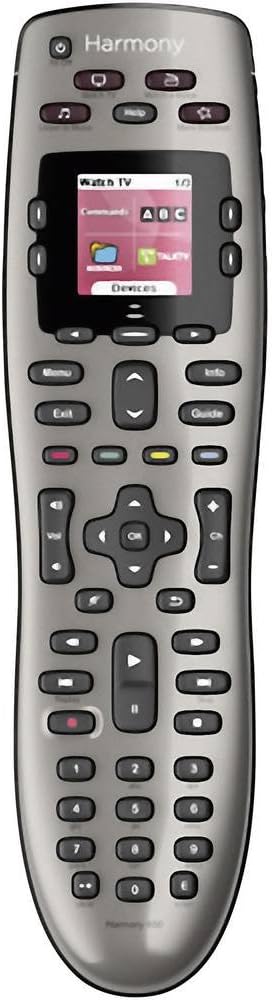
The Logitech Harmony 650 is a universal remote control designed to replace up to five remotes, featuring a colour smart display with intuitive icons and backlit buttons. It supports over 6000 brands and 225,000 devices, ensuring broad compatibility. Setup is streamlined via guided online software for Windows and Mac, and one-click activity buttons simplify multi-device control. Powered by AA batteries, it offers a premium, clutter-free entertainment experience tailored for the modern connected home.


| ASIN | B00IRUS6K6 |
| Battery Types | 2 x AA or 2 x AAA batteries |
| Best Sellers Rank | 43,507 in Remote Controls (Electronics & Photo) |
| Brand | Logitech |
| Brand Name | Logitech |
| Button Quantity | 22 |
| Colour | Grey |
| Compatible Devices | Audio/Video Receiver, DVD/Blu-ray Player, Set Top Box, Television |
| Compatible Television Models | Roku 43R4A5R, Roku 50R4A5R, Roku 55R4A5R, Roku 55R6A5R, Roku 55R8B5, Roku 65R4A5R, Roku 65R6A5R, Roku 65R8B5, Roku 75R4A5R, Roku 75R6A5R, Roku 75R8B5, Samsung GQ65Q800TGTXZG, Samsung QE50QN94AATXXU, Samsung QE55LS01TAUXZG, Samsung QE55LS03AAUXXC, Samsung QE55LS03BGUXXU, Samsung QE55LS03RAUXZG, Samsung QE55LS03TAUXXC, Samsung QE55QN700ATXXU, Samsung QE55QN700BTXXU, Samsung QE55QN85AATXXC, Samsung Q… |
| Compatible devices | Audio/Video Receiver, DVD/Blu-ray Player, Set Top Box, Television |
| Connectivity technology | IR Wireless |
| Controller Type | Button Control |
| Customer Reviews | 4.2 out of 5 stars 5,526 Reviews |
| Global Trade Identification Number | 05099206051560 |
| Item Weight | 0.18 Kilograms |
| Manufacturer | Logitech |
| Manufacturer Part Number | 2229250 |
| Max number of supported devices | 8 |
| Maximum Number of Supported Devices | 8 |
| Maximum Range | 10 Metres |
| Model Name | Harmony 650 |
| Model Number | 915-000229 |
| Network Connectivity Technology | IR Wireless |
| Number of Batteries | 2 AA batteries required. |
| Product Features | Learnable |
| Special feature | Learnable |
B**.
Great piece of kit
I’ve had this for about 6 months now & feel like I’m able to give a decent insight into it & share my findings. With a compatibility list that should meet the needs of any user there’s no denying its use & purpose of cutting down on remote controls, initial setup is simple but fine tuning will need to be done on the app (Android & iOS) or I found it easier to do all my set-up on the pc app. Getting the remote set-up & all your devices synced will take some time & be ready for some frustrating moments when adding “activities” from my experience it wouldn’t change the selection on my LG tv when needed & failed to turn on my Xbox One X but after a few tweaks & re-syncs I managed to get the kinks ironed out. The remote is responsive & the touch screen is an essential when adjusting lights, favourite channels etc. It has a nice weighted feeling to it but you’d expect that from a premium product that is essentialy £200 for a remote control! I’ve had no issues with any of my devices (4K LG tv, Virgin, Xbox One X, Phillips Hue, Nvidia Shield, Nest & Smart Home switches) some devices will have a much more of a customisable functionality when compared to others but you can edit the remote buttons or touch screen to liking in the app. Remote holds its charge really well in my home (with 4 children & my wife constantly changing channels & lights) I generally dock it when playing a movie just to keep it topped up. I’ve had no need to use the IR blasters as the hub is in direct line of sight to the remote but I’m sure they work just as well. Is this remote worth the price tag??? If you’ve only got a few devices then I’d say no but once you factor in lights, switches & multiple other home entertainment devices then I’d say yes definitely! The customisation & ease of use (once set-up) will make movie nights considerably less frustrating when your hunting for the volume control or pause button.
M**S
Not perfect, but very good. The best I have tried so far.
This is a complex system that I am still exploring after three months. I have previously used every version of Philips Pronto and have now moved on to Harmony with the Elite&hub combo. So I have some experience of programmable remotes. Users of other programmable remotes such as Prontos will be frustrated at the distinct lack of discrete on/off codes in the database. Some are present,but hidden behind questions encountered when adding devices. These are usually discrete power-on and power-off options. Answer that question wrongly and Harmony will give you only a power toggle, which is as much use as a chocolate tea spoon. Discretes for non power related functions are sometimes present, such as switching AV inputs. Secondary discrete options are very rare. Experience shows that many of these may to exist, but not in the public databases that you are presented when you add a piece of equipment. This shows up when you want to, say, switch an Arcam amp input to Direct Stereo On. You only have an on/off toggle option. This has a 50 50 chance of getting it right. Harmony get around this by having a question visible shortly after activity start asking if it started correctly. It the offers you the toggle buttons to “fix” the startup. To my mind the correct fix is that if a system has a “turn function on” remote code, and Harmony can send he code, then the device codes from Harmony should carry the code. Instead you have to learn the discrete code from your old Pronto into the handset. Oh yes, there is a bug whereby around 15-20 codes into a learning session my hub locks up for 2-3 minutes. When this happens you should simply wait for it to come back to life. There is no web interface into which you can feed codes either. So you must keep an old Pronto alive to setup complex scenes. Now for the best bits. For a novice user the setup is about as easy as a complex system like this can be. You really can get something working in a few minutes armed only with brand names and model numbers of your target devices. After initial setup you can enter the activities setup menus and that is where the real work begins. Alexa integration works at a basic macro level. The link between Alexa and Harmony is quite basic. When you add the Harmony skill (when you can figure out which coloured skill to use) you see a list of Harmony activities. Watch out!!! This is the only time you will see this list! At this point you add descriptive words to each activity. You cannot test them (the verbal command) at this point. If you get them wrong you must now complete the skill setup, test each activity, then to fix broken ones you must delete the Harmony skill, and re-add the skill again. This quickly becomes tiresome. Especially when you realise that the sequence is buggy. Some of my command labels vanished, some moved around when re-adding the skill and I had seven “television” labels on different activities appear from nowhere on one occasion. Rather annoying. When this happens best go to the Alexa Smart Home -> Scenes menu where you find all your Harmony activity names in amongst the built-in Alexa scene collections. Delete all the Harmony skills from here and then delete&add the Alexa Harmony skill again. So the first lesson is to completely setup Harmony before introducing Alexa. The second lesson is to create a clear and distinct list of different Alexa commands for each activity. If they are too similar Alexa will get confused. Remember that you will need Alexa to recognise these words above a lot of music or tv noise at some point in the future and you get some idea of the problem. So why the 5 stars with all the warnings above? Well whilst it is complex it is extremely powerful. Once setup it works superbly. Just be aware that you will need to spend some real time getting it just right before you buy into this system.
M**A
Once you get past the learning curve, it's good but flawed
TL;DR: There is a learning curve. Things aren't quite as intuitive as they could be. Some functionality might not meet every requirement. You can't use smart devices that are dependent on things such as the Smart Life app. Alexa integration mostly works, with some minor issues. Those complaints aside, this is a really helpful device that can simplify your set up if you're already stuck with multiple remotes. It has a wide range of compatibility with set top boxes, TVs, soundbars, A/V receivers, games consoles and other devices. Personally, I'm mostly happy with it and it is already my primary method for controlling my TV, Sky box, Xbox and Fire Stick. To understand how this works, you need to keep Harmony's cold, hard robot-logic in mind. The Harmony Hub aims to track what's currently on and what's currently off. If you begin an Activity, it will turn on all devices needed for that Activity, and turn off devices not currently required. What this means is that if, for example, you add an Activity such as "Sky Movies" to automatically load the Sky Cinema on-demand page but don't add your soundbar and TV to that Activity, it will assume they're not needed for that Activity and turn them both off. When first getting to grips with this, it can be confusing or illogical. It can't guess what you need for an Activity, so it relies on what you tell it you need. Therefore, if you add an Activity for which you would logically only begin when certain devices are already on, it doesn't understand this and will turn them off unless you tell it you need them on. If Harmony doesn't know something is on, for example, if you've already switched your TV on and then try and start an Activity that requires the TV, it's going to turn your TV off. All of this might sound a bit confusing, and to be honest, it can be but it's not too bad once you get to grips with it. If you make a mistake when setting up an Activity and forget to include something that needs to be 'on', then you can just hit 'Re-Run Activity' in the app, add the device(s) that you need to be on, and fix it that way. You don't need to delete and rebuild an activity from scratch, fortunately. The initial setup is an absolute pain - or it was, in my case. Harmony bugged out on several occasions. Eventually it worked, but be prepared for some frustrations. For me, the Hub didn't go automatically into pairing mode, the remote didn't start syncing, the app claimed there had been an error - but finally, it worked. Before you set up, the Harmony Hub can only connect to 2.4Ghz WiFi. If you have different SSIDs set up for different WiFi bands, you'll need your phone to be connected to the 2.4Ghz band as well. This is also the case for when you access the app from your phone in the future to add, edit or reorganise Activities. When you finally get it set up and are properly acquainted with how it works, then yes, it will simplify your setup. It can echo the functionality of a whole heap of remotes. I have Activities set up to turn on Sky, turn on Sky and jump straight to my planner, or Sky Cinema, or Sky Box Sets. I have an activity to turn on my Xbox One, or Fire Stick. On some Activities, I've even set it up to change settings automatically on my soundbar. It's very convenient but to get the full effect, and to reduce frustrations, you have to make Harmony your primary remote and controller. Whenever something is already on, and Harmony knows this, it won't turn them off and on again. It'll just skip that command and go to the next one. This means if you've been watching Sky and then want to switch over to Fire TV, you can tell it do that, it'll turn off Sky, keep the TV and soundbar on, and then switch the input to Fire TV. You can also use BlueTooth to allow the remote to control Fire TV. Instructions are given in the app and the pairing is pretty straightforward. Regarding Alexa integration, it works, for the most part. Once you've told Harmony what your TV service is, where you're located and gone through the initial setup, selected favourite channels, etc. you can say, "Alexa, turn on BBC One" and Harmony will turn on your TV, your soundbar, your receiver (eg. Sky Box) and key in 115 for BBC HD (or the relevant channel number). It automatically understands this command comes under the basic 'Watch TV' command, so you can say "Alexa, turn off Sky" (in my case) when you're done, and it'll shut everything back down again. You can also set a default channel for the TV to automatically turn to when Switched On, although I've disabled this. There can be a bit of a delay between Alexa confirming the command and the Activity beginning. Alexa should automatically detect new 'scenes' as they are created, although there may be a bit of a delay. These 'scenes' are your Harmony Hub's activities. I discovered that Activities created before you've linked the device with Alexa will not be found. You can fix this be 'editing' them in the app, saving the edit and then Alexa should discover them. If you have devices that are already Alexa-enabled (such as an Xbox), Alexa can get a bit confused. You might not want to disable the existing integration, because of the added functionality it brings. My suggestion would be to make your Harmony Activity have a different name to the device's regular command. For example, in the case of my Xbox, I've given the activity the name 'Xbox One' so I can say 'Turn on Xbox One' and Harmony will sort it out. If I only give it the name 'Xbox', then Alexa asks if I want to open the enabled Xbox skill. The reason to keep both skills is to maintain the 'launch' function of the Xbox-integration. Have Harmony handle on/off. Have the Xbox skill handle game and app launches. If Play/Pause functionality is important to you via Alexa, it's worth noting that this is a bit hit and miss. Take my Sky box for example. Providing the Sky box was the last thing Alexa interacted with (via Harmony, of course) for a time afterwards, she will follow Play/Pause/Rewind/Fast Forward/Stop commands and send them, but eventually, they will cease to work. I've tried commands such as 'Tell Harmony to Pause' but that doesn't seem to work, as she asks if I want to use the Harmony Second Hub skill. It's simpler to just do it with the remote, to be honest. I may be missing a trick here, but the Internet has yet to provide me with an answer, sadly. I have had issues changing the channel through Alexa to Sky Sports Main Event. She just doesn't seem to get that one, although she has no problems with Sky Atlantic, BT Sport, or any other channel, to my knowledge. When reorganising Activities, reorganising them on the phone does not reorganise them on the remote. You'll need to do them both manually. If you have a lot of devices, you may want to create a 'catch-all' activity to turn everything off. The remote itself is quite nice to use. I've found it offers functions my LG Magic Remote was missing, and I've not yet discovered anything it can't do. You can re-assign the functions of some buttons if you wish, so you can have a single button press to perform an Activity. Not bad. There can be a delay with syncing between the Hub and the Remote, so be aware of this. Where I'd say this device falls short is in it's "sequences" option. This allows you to assign a button on the remote to a series of mimicked commands. For example, you could use a Sequence to carry out all the button presses you'd need to switch the TV's colour options to a particular preset, and then change the soundbar to a different sound preset. This works well, but, adding steps can be cumbersome. It doesn't appear there is an option to simply say "Press Down four times", instead having to add that instruction the number of times. Nor can you copy sequences across from one Activity to another. If you set a sequence for use with your Sky box, for example, you have to re-create the sequence from scratch if you want to use it on your Fire Stick. An oversight, to be honest. If you're looking for complete smart home control, do be aware that there are limited 'hubs' that the Harmony Hub can work with. If you've been buying Smart Life App bulbs, such as myself, they are not going to work with this. You'll need something like a Smart Things hub or a Philips Hue hub to really get the most out of it. That's something I may look at in the future, as I quite like the idea of a 'Cinema' Activity that automatically changes my lights to my preferences, loads up the Fire TV and is ready to watch a movie. Overall, yes, it's a bit of a faff to set up. It's not as intuitive as it could be and there are some missed opportunities, but once I got past the initial issues and understood how it all works, I'm pretty happy overall.
C**S
Get your remotes under control
I could have built a wall out of the number of remote controls I used to have beside my side of the sofa. It was getting out of hand and I’d been considering the Logitech Harmony range for some time but baulked at the cost when it’s at full price. However, around Black Friday last year I finally buckled and ended up going nuts with building an Alexa-equipped smart home, with the Harmony front and centre. I bought it to do three things; Do away with multiple remotes, allow my TV to be controlled by Alexa and to provide a shortcut to operating multiple devices together. My review is based therefore not just on the Harmony but its integration with Alexa. It’s a slick piece of kit, well built and a premium product. The bundle I got was for the remote control, the hub and a couple of “IR blasters” which help pick up reluctant devices. It also has a docking station for charging. Battery life is supposed to be very good, however I park it in the docking station every night as the dock is on the table next to my chair and it’s easy to locate one-handed in the dark. As far as getting started is concerned I’m not going to claim it’s the most straight-forward thing in the world to set up, but if you have a bit of technical nous it’s intuitive enough. There’s a good App that you’ll need to download to get the most out of the Harmony, from which you can detect and set up your devices to be controlled. You can also get creative and set up Activities, allowing you to control multiple devices with a single command. Where things get really good though is if you have Amazon’s Alexa in your house. You’ll need to activate the necessary Skill in the Alexa App, but once done you can control your devices by voice as if you were using the physical remote. Set up correctly you can accomplish multiple tasks very easily. For example, I say “Alexa, watch a film” and the TV, Blu-ray player and soundbar all come on. You could add to that with additional smart sockets/lights and have lights dim should you so wish. Get as creative as you want with your devices. We also say “Alexa, goodnight” and all of the AV equipment turns off with a cheery “Goodnight” back from Alexa. Voice control is very good, if not infallible. I’d say 9 times out of 10 our voice commands work correctly, and on the 10th occasion repeating the instruction will work. Our most commonly used commands, other than turn on and off, is “Alexa, turn on BBC1, ITV, Dave, Challenge TV etc” or “Alexa Pause the TV/resume”. Currently, the Harmony has replaced remotes controlling most of my devices in the living room. It controls my LG TV, BT Youview box, Blu-ray/DVD player, Apple TV, Xbox and soundbar. It is not able to control the Sony PS4 because Sony won’t allow third party access to the console. I’ve got the Harmony remote configured to cover the vast majority of commands I normally use. Sometimes it takes a bit of concentration to flick between the remotes on the Harmony’s touchscreen, or to remember which of the user-defined shortcut buttons do what, but that’s not a criticism of the remote. The Harmony has enough power and intelligence to do what you need it to do. My wife does keep a couple of the original remotes on her side of the sofa though, which are useful to have as a standby. In summary, we’ve been using the Logitech Harmony remote and hub for about 9 months now and it has performed exceptionally well in that time. It syncs well with Alexa and voice commands are better than I expected. It’s a lot of money at full price, but it’s on offer regularly enough to become reasonable value. I say that the value of a gadget is in whether you use it regularly, and this is used daily. If you’re into your tech then it’s definitely a good one.
D**Z
Great hardware let down by frustrating software
First things first, the hardware is excellent. The remote has a pleasing feel and heft to it, the OLED screen is bright and for the most part responsive. The button backlighting can be adjusted to your tastes. The software lets the ensemble down. The main problem I have with it is that it imposes an unnecessarily restrictive mechanism for creating macros (the software calls these "activities"). The principal issue with them is that they are designed in a way that assumes that you will be turning all of your involved equipment on at the start, and off at the end. The show-stopping issue in this is that you can't remove the "power on" or "power off" commands in any macro. Any activity that you run carries on running until you decide to finish it, at which point it goes its "exit commands", switching all of the involved A/V equipment off. You can mark a device as "always leave on", but then power commands that you might want to use explicitly in a macro are ignored completely. For example - say you're already watching TV, your TV, Sky box and amp are switched on. You decide you want to play some games and want your TV to change into a "game mode", involving navigating around the onscreen menu. In many cases A/V equipment has one button to toggle power - in which case you would not want to send any power commands to the TV or the amp. You *would* however want to tell your TV to change the input, and possibly the amp too. You can't do this reliably though because as soon as you include the TV and amp in an "Activity" and run it, the Elite will send "power on" commands, which you can't remove or disable, which wlil then turn off your equipment even though you just want to play games. I have no idea why Activity power commands are restricted in this way, it seems like such an obvious thing that the user should be able to *choose* whether a device is sent a power command at the start and/or the end of the activity. I am also not totally enamoured with how the software uses the OLED display on the remote. The Elite software does not really exploit the fact that the remote has this screen at all, it lists devices and activities as a basic list - you can't have a grid, or any kind of customisation of the layout beyond reordering device commands. On some A/V devices you can easily have 30 or 40 actions that show up on the remote, that you have to scroll through in a cumbersome way. Another glaring oversight - if you don't select a device or activity, several of the buttons do nothing at all. The volume rocker only works after you have chosen a device or activity manually, which means that to do something as simple as increasing the volume on your amp you have to press DEVICES, then select your amp, then use the volume key. It's tough to argue this as being convenient, in fact you end up feeling like you're going out of your way to use this remote for commonplace tasks when you can just use the old remote that the Elite was supposed to replace to change the volume instantly. If the software was open sourced, or the remote software itself had more flexibility it would be an excellent piece of kit. As it is you are locked into the quality of Logitech's software which, it has to be said, is not impressive in the least.
W**B
A dream, even with my unconventional AV setup
My living room set up is not conventional, and I was worried that this wouldn't be able to suit my own needs - to give you an idea I've the following "devices" - Mitsubishi MDT 42" LCD Monitor - Sky+ HD Box - Neet 5 x 1 HDMI Switcher http://www.amazon.co.uk/gp/product/B001DAVA64?psc=1&redirect=true&ref_=oh_aui_detailpage_o01_s00 - MXIII Android Box running XBMC/Kodi Because the Mitsubishi monitor only has 1 x HDMI input, switching between Sky and MXIII meant manually switching inputs via the tiny remote that came with the neet hdmi switch. This meant having 3 remotes at hand at all times, a royal pain. Anyway, first impressions: The remote is sturdy and good quality build. It fits nicely into the hand and is comparable with a Sky+ remote. The buttons click but it's a soft click as opposed to a cheap plastic click. The screen is more reminiscent of mobile phones in the early naughties but that's not a deal breaker for me. The only real criticism I would have of the remote build is the "ok" button that's in the middle of the 4 arrow buttons is smaller than what I'm used to coming from a Sky+ Remote. Programming the Remote: The myharmony software (I set this up on Win XP) worked a dream. It guides you through syncing every one of your "devices" on the remote one by one. The monitor and SkyBox were so easy to set up. Just enter the manufacturer of the device and the product code and it's done. It was after this I thought I'd run into problems, and while I had to manually program the Neet Switcher, this just meant putting the Logitech 650 (650) and Neet remote facing each other and pressing the 2 buttons on the Neet switcher that I use (Input 1 and 2). Similarly the MXIII box I assumed would be a nightmare, but again, I entered the product code as MXII and it worked perfectly with the exception of a few buttons which were easy to fix by pointing the MXIII and 650 remotes at each other and letting the 650 know which buttons were faulty, and it then fixed this by learning from the MXIII remote. Activities: This is a great feature, and I within minutes I was able to set up the following activities, triggered by the 2nd top row of buttons: - Watch TV: Switch input on Neet to input 1, power on Sky Box, remote now works SkyBox functions. - Watch a Movie: Switch input on Neet to input 2, power on MXIII, remote now works MXIII functions. After you've tested each activity, a helper appears in the remote's display, giving further guidance if needed. One button press on the 650 now does the work of what previously was 2 button presses on 2 separate remotes. Even Mrs Wealthy was impressed with this and she's not impressed easily in technological matters! You also have the option of assigning other functions to unused buttons on your remote, and you can manually switch the device you wish to control via the 650's display (If you don't want to get into setting up "activities" straight away) I played with this for no more than 45 mins last night and had all my devices working and the activities set up all thanks to the software. Cannot recommend this enough for someone looking to amalgamate tons of messy remotes into one, with no advanced technical knowledge required.
T**.
A good hardware idea, ruined by grotesquely incompetent software
This is the most frustrating product I have seen in a very, very long time. The key issue is a disastrous app and the patronising mindset of the Logitech developers. The app is just absurd - do not bother even trying. When you start it it plays you a video which basically tells you what the Harmony remote is - and then, without bothering about explaining any detail of the setup process, it requests you to enter your Wifi security key. Lasted when you are trying to connect to a FireTV via Bluetooth - waiting for minutes to connect (it won't, because it will only trigger this process when you first run an action interacting with the FireTV) - it is time to realise this is not going to work. Getting even there is actually really difficult - the designers of the app insisted using huge fonts and positioning buttons at the bottom of the screen, so they are always hidden under the edge of the screen - apologies, I am "only" using an iPad Pro 10.5, maybe this setup requires the 12.9 inch version to run... The Desktop app is much easier to use, runs the firmware updates which apparently are required, and initially looks quite reasonable. The point of failure was then when I tried to access my projector which is connected to its own Amazon Fire TV (easier than running a cable to the ceiling...). The software rejects setting up an action starting a fire TV and a projector because I did not include a "channel changing device". I am still not quite sure what a "channel changing device" is - the projector has multiple inputs and can change between them, and the FireTV will play whatever I want - but apparently Logitech has a very clear view which HDMI devices you are supposed to connect, and prevents you from stupid mistakes such as connecting a projector and a source directly. BTW - you cannot just look up a device in a database, like "Amazon FireTV 2017" - you need the precise model number to configure it. So I had to pull out the Amazon device under the cupboard and copy the "LDC9WZ" (yes, that's the model number Logitech expects you to enter). Pity I have a Chinese HDMI switch without a model number printed on it (Logitech knows the brand and probably also the device, but without breaking the device open I will never find out the number...) I thought I could at least use it as a (very expensive) "all in one" remote - but again smart Logitech developers kept me even from this last resort. Did not happen - the remote will not allow you to use it to control individual devices unless you have completed the entire setup of actions, and will just tell you to use the app to complete the setup. So all in all - a nice hardware idea, but completely ruined by an utterly incompetent team of software developers who try to straightjacket the user into what can and can't be done with the device, and (in case of the app) prioritise design completely over usability. After 6 hrs wasted I think this is not a product for me. I admire some reviewers for their patience who spent 3 months and still try to make certain features work - I do not have the time for spending more than half a day programming a remote to make a projector and a Fire TV work together.
B**N
The Best Real World Remote
Best remote I've ever used. I had the old Harmony One before which was great and lasted five years before getting a little testy. This new remote is smaller and therefore easier to hold and is really easy to use. Setup looks more complicated than it is (you will need the exact version numbers for your kit although I found Sky DVR worked fine) but once that's done your good to go. My remote works an AV receiver, the sky box, a plasma TV and pioneer Blu ray player, basically it turns everything you want on in the right order and handles the sound and all other commands with ease. A nice touch is during the setup you can very easily program your favourite channels onto the remote just by selecting from a list, then the remote will populate a screen with the individual channels logos which are then selected by just touching the required logo. The touch screen is much like your smartphone and by swiping left and right it'll select individual pieces of equipment or your favourite channels its all very easy to use and understand. A couple of extra niceties are the help button which will guide you through any problems you might have and if you select a single piece of equipment from the devices button you can access all of the devices menus including individual setup or settings, this is especially handy for selecting different surround sounds from your AV receiver if your a bit of a nerd without having to find the original remote. Finally it comes with a hub which allows your stuff to stay behind a door and still be operated or allow you to get Alexa to turn everything on for you, but for those of us who still have all their stuff on a rack you can use the remote like any old fashioned remote and just point it at the telly and like wonderful modern magic everything still works.
E**C
Jammer!
Heel OK! Jammer dat de productie is gestopt!
P**A
Dziala
Jest ok działa
G**A
La meilleure télécommande de la division Harmony de Logitech !
L’expérience acquise au fil des années par Logitech Harmony avec paramétrage par logiciel PC est bien visible sur celle-ci (je possède 2 télécommandes harmony 525 et 555 dont certaines touches étaient de mauvaise qualité mais aussi de part leur conception). Tout a été repensé pour trouver le meilleur compromis entre des touches toutes rétro éclairées, dures et tactiles (paramétrables à souhait, tant au niveau du texte que de commandes à rajouter dans une activité) que l’on peut dérouler comme sur un Smartphone pour une taille d’écran correct avec adjonction possible d’une image de son choix en fond d’écran, donnant un côté plus sympathique. La prise en main est très bonne, elle est munie d’une coque d’aspect à peine granuleux pour éviter de glisser sur une surface lisse. L’emboitement de celle-ci est parfaitement ajusté sur son socle très discret. L’ensemble est du plus bel effet sur un meuble pendant sa recharge. La qualité des touches à l’air d’être bien là . Le logiciel PC, après un temps d’adaptation est bien réalisé, facile d’utilisation . Les activités à régler sont intuitives après avoir rentré tout ses appareils (bien mieux que sur le logiciel utilisé pour mes anciennes harmony). Les mises à jour sont assez rapides avec un suivi du déroulement. Ensuite, vient le test du bon fonctionnement de la télécommande afin de valider si tous les processus se déroulent bien. Si ce n’est pas le cas, la touche aide vous permet de corriger automatiquement certains appareils, notamment en rajoutant jusqu’à 2 déports infrarouges, inclus dans la livraison. Dans mon cas, le hub se trouve dans un meuble spécial audio-vidéo semi-fermé, celui-ci reçoit les ordres de la télécommande et les renvoient aux appareils en Wifi, Bluetooth et infrarouge avec également une autre possibilité que la télécommande envoie directement le signal infrarouge sur l’appareil . En cas de problème de commandes non résolues automatiquement par le hub et la télécommande, vous pouvez accéder dans le menu paramètres au réglage manuel de l’assignation de la télécommande et du hub . En parcourant l’ensemble du logiciel, vous allez découvrir énormément de réglages, d’ajustage comme la sensibilité des touches, le temps de réponse, mettre ses chaines TV favorites que dans une activité (dommage) et bien d’autres possibilités pour votre plus grand bonheur. La télécommande est aussi complète, s’allume, dès qu’on la prend dans la main (très utile le soir) et s’éteint au bout de quelques secondes lors d’inactivité. Deux touches tactiles de chaque côté en bas de l’écran, pour lancer une activité ou un dispositif. Quand vous lancez une activité et que vous avez, par exemple, oublier de mettre une commande de TV dans celle-ci, vous appuyez sur devices, vous choisissez votre tv, utilisez la touche dure ou tactile souhaitée de celui-ci et vous rebasculez sur activités, votre activité en cours qui est en blanc, réapparait, un appui tactile et vous revenez dans celle-ci, très simple et pratique. Vous pouvez aussi faire fonctionner vos équipement sur tablettes et Smartphones, en ce qui me concerne sous Android 7.0 : Asus 10 pouces dernière génération et Samsung J5 (en téléchargeant l’application my harmony dans le Google store). C’est un vrai plaisir d’utilisation, notamment sur la tablette 10 pouces où vous voyez, verticalement, toutes les activités sur votre gauche et vos appareils sur votre droite. Comme dis plus haut, vous pouvez aller chercher une commande d’un dispositif et revenir dans votre activité en cours. Vraiment, une belle réussite, grâce à un excellent travail de la division recherche et développement Harmony de Logitech, secondée par un support technique téléphonique gratuit, compétent, à l’écoute de nos problèmes ainsi que des remarques que nous pouvons leur faire pour l’amélioration de leur produit (pour ma part, je les ai appelé 2 fois : lors de la mise en route, création d’un nouveau compte, association du hub avec livebox et ensuite pour un réglage sur la tablette avec remarque sur les chaines favorites pour une seule activité). Cet ensemble m'a été proposé par Amazon à un prix raisonnable, fin novembre 2017. A conseiller vivement. NB : N’oublions pas que pour fabriquer un très bon produit quel qu’il soit, il faut une très bonne équipe qu’il faut payer à leur juste travail, dans tous les domaines : Services Recherche et Développement avec des années d’études, Fabrication, SAV et Réseaux de ventes, sans être sûr d’en tirer les bénéfices attendus. Le prix n’étant que la conséquence de la demande du marché, qu’il faut intégrer dans son analyse, pour générer des milliers voire des millions de ventes du produit concerné, avant de rentabiliser tous les investissements.
M**G
Tolle Fernbedienung mit einer Menge an Funktionen!
Ich habe viele Geräte und muss mit 5 Fernbedienungen agieren, wenn ich einen Film schauen möchte. Dies wurde mir auf Dauer etwas zu anstrengend und ich habe mir die Harmony Elite Fernbedienung mit Hub zugelegt. Die Einrichtung ist super einfach und funktioniert problemlos. Auch das WLAN wurde erkannt und hatte nun auch nach mehreren Monaten keine Aussetzer oder Probleme gemacht. Die Bedienung ist intuitiv und die Menügestaltung sehr benutzerfreundlich. Der Touch-Screen reagiert exakt und schnell. Wenn mal die Fernbedienung keinen Saft hat, weil man vergessen hat diese zu laden, dann greift man zum Handy und steuert alles über die Logitech App. Klasse! Der Hub verteilt die Signale von der Fernbedienung auch an Geräte in Schränken oder an Stellen, die für Infrarot-Signale schwer zu erreichen sind. Es sind viele Geräte schon in der Datenbank hinterlegt, so dass man eigentlich zu 99 Prozent der Fälle seine Geräte direkt findet und hinzufügen kann und keine Funktionen programmieren muss. Es gibt aber auch die Möglichkeit, dass Fernbedienungen angelernt werden. Leider kann ich mit dieser Fernbedienung keine Funksteckdosen bedienen, da diese kein WLAN haben und in einer Frequenz arbeiten, die die Fernbedienung nicht unterstützt - schade, das wäre wirklich gut gewesen, aber nicht weiter schlimm. Des Weiteren habe ich festegestellt, dass LED-Ketten und deren günstige Fernbedienungen bzw. Steuerungen teilweise die gleichen Frequenzen haben wie mein LG-Fernseher. Wenn ich beispielsweise bei meinem Fernseher leiser mache, wechselt das LED-Licht von Farbe X zu weißem Licht (RGB LEDs) und wechselt dann immer von AUS zu AN oder von AN zu AUS. Dies ist natürlich unschön, aber hierfür kann die Fernbedienung nichts. In diesem Fall muss ich ein anderes Steuerelement für die LEDs suchen, dass eine andere Frequenz verwendet. Ich habe des Weiteren verschiedene Befehle erstellt: TV schauen, Film schauen, Musik hören und je nach Aktivität werden unterschiedliche Geräte gestartet - wunderbar! Für Technik-begeisterte eine tolle Fernbedienung mit stolzem Preis, aber tollen Funktionen und toller Haptik und Ergnonomie. Für mich ist sie jeden Cent wert und liegt auch toll in der Hand! Hier hat sich Logitech wirklich ein tolles Produkt überlegt und dieses toll umgesetzt! So wird ein Filmeabend noch besser!
A**I
Fa esattamente quello che promette, e molto bene!
Prima di comprare quest'oggetto ho letto le recensioni, specialmente quelle meno positive e stavo quasi per rinunciare all'acquisto. In particolare la funzione di auto-apprendimento, che considero essenziale per aggiungere comandi non previsti dalle configurazioni "predefinite" da alcuni veniva riferito come non disponibile, a differenza di quanto lascia intuire il sito Logitech. Per fortuna alla fine ho deciso di rischiare (visto che la cifra non è irrisoria) e, per fortuna, ora sono qui a smentire la maggior parte delle critiche negative. Il telecomando fa esattamente quello che promette, è versatile, pratico, funzionale, semplice da programmare e, soprattutto, completamente personalizzabile in ogni aspetto. Naturalmente compreso l'apprendimento di qualsiasi comando eventualmente non presente, funzione assolutamente presente ed anche di semplice utilizzo (basta puntare il vecchio telecomando verso l'hub quando richiesto e premere il tasto da apprendere). Quelli che si lamentano che "c'è solo l'inglese".... per favore, siamo nel 2017! A parte che tutte le voci possono essere rinominate a piacere. Ma davvero preferiamo le traduzioni fatte con Google? La possibilità di programmare da PC, da smartphone o anche dallo stesso telecomando rende la personalizzazione molto agevole e chi si lamenta dei pochi secondi di attesa per la sincronizzazione dei dispositivi, evidentemente non ha avuto a che fare con un PC appena un po' datato, recentemente, altrimenti avrebbe sviluppato un minimo di pazienza nei confronti delle "attese". Ho letto addirittura di chi diceva di rimpiangere il suo vecchio Philips Prestigo e si lamentava della imprecisione del touch display di Logitech. Trasecolo! Io ho lanciato dalla finestra il mio Prestigo perché non ne potevo più di non riuscire mai a premere un comando solo per volta o a fare acrobazie spingendo a più non posso per far accettare un comando al touch meno responsivo che abbia mai visto. Al confronto il telecomando Logitech è una vera meraviglia! Nessun paragone possibile! Unico vantaggio del Prestigo - se vogliamo - era che, essendo lui stesso a produrre gli impulsi ad infrarossi, potevi portarlo ovunque (anche in altri locali) per pilotare dispositivi distanti. Questo qui non è possibile perché è l'hub a pilotare e non lo puoi portare in giro. Nel caso dovresti comprare uno o più hub supplementari. Però, almeno, con l'Harmony non hai la necessità di tenere costantemente il telecomando puntato verso i dispositivi da pilotare e questo è molto comodo. Ho letto che qualcuno si lamenta della latenza dei comandi, pur sapendo che sono liberamente modificabili. Si tratta semplicemente di una necessità per chi ha televisori (come il mio) che dopo il "power on" hanno bisogno di diversi secondi prima di essere pronti ad accettare ulteriori comandi. Se non ci fossero queste latenze non sarebbe possibile programmare sequenze di azioni perché i comandi caduti nella fase di latenza non avrebbero esito. "Sì ma non si può scendere sotto i 500 millisecondi! Inaccettabile!!" Non possiamo aspettare neanche mezzo secondo per comando? Ma non siate ridicoli! In conclusione l'unico punto negativo su cui concordo è che il prezzo è effettivamente un po' elevato per la tipologia di articolo ma, dopo un ragionevole periodo di prova, posso dire di essere completamente soddisfatto e che lo ricomprerei ad occhi chiusi. Forse si sente un po' la mancanza di un manuale che aiuti a comprendere tutte le funzionalità del software in modo organico (non mi piace l'idea di dover scorrere necessariamente la lista delle FAQ sul sito Logitech per capire le varie funzionalità , un manuale fatto come si deve, anche elettronico, sarebbe preferibile). A parte queste minime pecche confermo il mio giudizio: funziona e anche molto bene. Consigliatissimo EDIT: ho scoperto che è possibile istruire il software ad utilizzare il telecomando per pilotare i dispositivi emettendo lui stesso i segnali infrarossi invece dell'hub (anzi, per ogni dispositivo si può indicare da quale emettitore debba essere pilotato scegliendo tra l'hub, gli estensori di segnale, oppure il telecomando stesso). Quindi anche l'unica mia perplessità (vedi sopra) viene a cadere perché posso portare il telecomando in ogni stanza della casa e pilotare veramente qualsiasi cosa. Ancora meglio di quanto pensassi! Aggiornamento 1 dicembre 2017: Con l'ultimo aggiornamento del software è stata aggiunta anche la lingua italiana, ora non ci sono più motivi per lamentarsi!
Trustpilot
1 month ago
1 week ago