


🚀 Upgrade your rig with speed and efficiency that keeps you ahead of the curve!
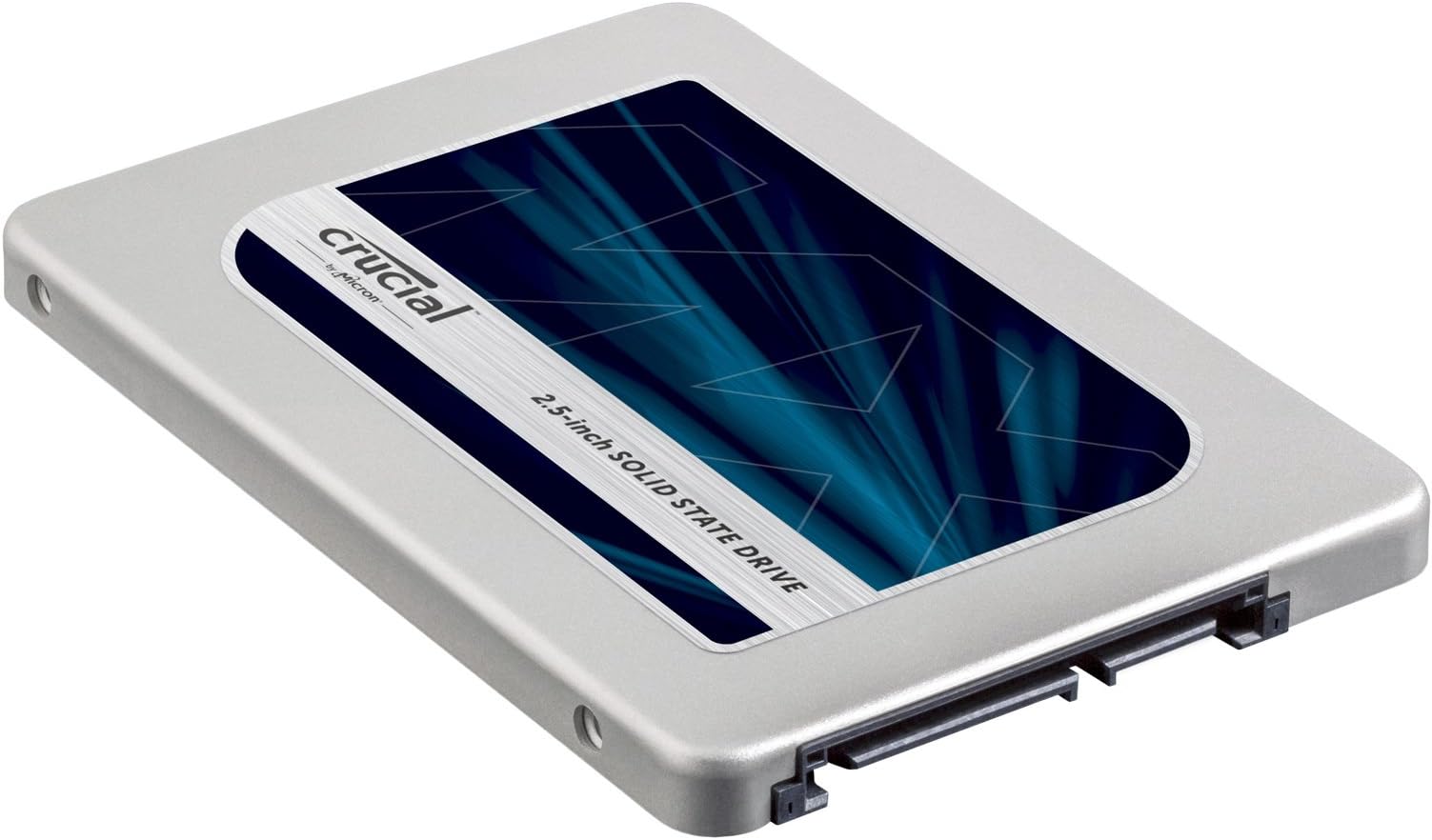
The Crucial MX300 275GB Internal SSD combines Micron’s 3D NAND technology with SATA interface to deliver up to 530 MB/s sequential read and 510 MB/s write speeds. Designed for mainstream users, it offers excellent random I/O performance (up to 92k reads and 83k writes IOPS) while being 90x more energy efficient than traditional HDDs. Its Dynamic Write Acceleration and support for features like Momentum Cache optimize real-world performance, making it ideal for gamers, developers, and professionals seeking a reliable, fast, and power-conscious storage upgrade.


| ASIN | B01IAGSD5O |
| Are Batteries Included | No |
| Best Sellers Rank | 85,630 in Computers & Accessories ( See Top 100 in Computers & Accessories ) 539 in Internal Solid State Drives |
| Brand | Crucial |
| Colour | Grey/Blue |
| Customer Reviews | 4.5 4.5 out of 5 stars (13,428) |
| Date First Available | 21 July 2016 |
| Form Factor | 2.5-inch |
| Guaranteed software updates until | unknown |
| Hard Disk Description | Solid State Drive |
| Hard Disk Rotational Speed | 530 RPM |
| Hard Drive Interface | Serial ATA |
| Hard Drive Size | 275 GB |
| Hardware Platform | PC & Mac |
| Item Weight | 12 g |
| Item model number | CT275MX300SSD1 |
| Manufacturer | CRUBC |
| Processor Brand | Micron |
| Product Dimensions | 10.3 x 0.71 x 7 cm; 12 g |
| Series | Crucial MX300 275GB SATA 2.5 Inch Internal Solid State Drive - CT275MX300SS |
D**J
Great as a Games drive
Bought the 750GB drive during the Amazon Superdeals for £109 to replace a pair of 500gb RAID1 drives in my main PC rig. The drive was to be used to store all my Steam Games - essentially a games drive. Whilst no slouch, my 500GB RAID1 drives were giving me around 250MB/s and load times for my games was ok. However, with some of the newer games coming in at around 40-50GB in size my requirements changed. What i needed was: - More space - Faster loading times - Reasonable price At £109 (Amazon Superdeal), 750GB, and stated specs of 530MB/s Read and 510MB/s Write this SSD drive certainly ticked all the boxes for me. So lets get the important stuff out of the way first: What is it? It's an SSD drive that comes in a 2.5" form factor, Rated specs of 530MB/s Read and 510MB/s Write and power consumption of around 4mW. This uses the new Micron 384Gbit 3D NAND flash memory similar to what Samsung introduced a while ago with the 850 pro Formatted with NTFS leaves you with around 698GB of useable space. Interface? It uses the standard SATA interface and should work with 3Gbps/6Gbps controllers on most motherboards. How did it perform? Good. Although not top tier and does not quite compete with the best (and more expensive) drives. But then again, this drive is aimed more at mainstream user rather than the extreme or enthusiast users. In terms of my own benchmarks ATTO gave readings at around 500MB's READ and 490MB's Write which is a little below stated Crucial specs. YMMV however. As of writing the current firmware is M0CR011 and there are no updates from Crucial. Load times for games has improved, and with some the loading screen is hardly noticeable - result! Also i've noticed that the temps in my Case has dropped a few degrees - no doubt due to me removing two large 3.5" mechanical drives. Conclusion: Good capacity drive at a reasonable price. Performance is good without being outstanding and I'm hoping this will improve with firmware updates. Reliability remains to be seen but so far (6 weeks) no issues. Overall i'm happy with this drive and can recommend - You even get a code for Acronis to download and use if you need to clone or image a drive!
S**B
Works really well on laptops with Crucial momentum cache enabled
I’ve been a big fan of Samsung drives, but the price difference on the 1TB was enough to make me jump ship to Crucial. I use it in a gaming laptop as my data drive (I have a 250GB system drive and then the Crucial 1TB for data, games and applications). The laptop is a recent (2017) MSI Apache 17”. It has space for one PCIe SSD and one standard SATA 3. I chose to go with a standard SATA because I’m lazy and didn’t want to mess about with moving the system disk. Anyway, all good, and decent for a SSD (but not outstanding figures) in CrystalDiskMark. That is until I downloaded Crucial Storage Executive and enabled momentum cache. The figures speak for themselves (see my screenshot of CrystalDiskMark). I've also added a second image from Task Manager showing how momentum cache works. The G drive is a traditional HDD transferring 25GB of data to F, a 1TB SSD with momentum enabled (I'm actually installing the game Fallout 4 from G to F). You can see that the SSD only occasionally writes data (about once every 10s). So, a very good thing about Momentum cache is the way it handles small files; it caches them to memory and only writes them to the physical SSD occasionally. This not only saves wear on your SSD, but it also makes certain tasks fly. I am a web application developer, and my build process (which involves working with literally thousands of javascript files) is now super fast (it would be even faster if node/npm was multi-threaded, but that's another story!). What are the downsides of doing this? Momentum cache uses your PC memory as a read/write cache, so you need to have a decent amount of memory. My laptop has 16GB, so all good there. I suspect it will work less well for 4GB systems, or if you are using a power-hungry application (such as Adobe Premiere, which I use). It also increases the CPU overhead. EDIT: I're realised Windows 10 Task Manager > Memory shows you the RAM cache (its marked as 'memory that has to be saved to disk before it can be used for something else' or words to that effect). I copied over the full install folder of Fallout 4 plus DLCs (29.6GB) onto a Momemtum enabled drive and the cache varied between 1 and 1.5GB. So the 4GB is never reached; more like >2GB. Crucial strongly recommend a battery backup if you use momentum cache (i.e. you can lose the cached data on a power fail), so other things equal you should only really enable it on a laptop. The cache is written to the real SSD on power off, so system shutdown takes longer (by 5-10s, so significant). But yeah, just look at those figures; well recommended for laptops with memory to spare; your system flies! Edit: Another good thing about the Crucial I'm finding is that it uses devSleep much more often than other SSDs. Since writing this review (5 months), the up-time for my SSD (according to CrystalDiskInfo) is only 9 hours when the physical up-time has been office hours (8.5 hours a day, 5 days a week). The low up-time saves both power and wear and tear, with no noticeable affect on access time. DevSleep only seems to kick in on laptops (it does not seem to affect my desktop), but is certainly something that will extend your laptop battery life (especially if you have two drives) and the life of the SSDs themselves. Oh, I also suspect the up-time is coming out so low because of Momentum Cache (RAM caching means less access requests to the SSD and more devSleep down-time), so devSleep and Momentum cache probably work together).
C**E
This is a really nice drive with competitive specs, but not quite the best. The price per GB, the extra GB's in this size category along with it being made by Crucial and with a stated endurance of up to 220 TBW all add up to a great value. Some have complained that nothing comes with the drive and other than the 9mm spacer that is true, yet this is pretty much how most all drives are sold these days. The one drawback if you were hoping for a good migration tool is that they supply a key for downloading Acronis 2015 which recently was updated with patch 6613 and is now supposed to support Windows 10. I don't trust True Image any more after a simple cloning failed and corrupted my original drive. I simply downloaded Macrium Reflect Free which is very reliable and supports Windows 10. The way that I configured my new drive may not be the fastest, but it is safe and reliable. After installing Reflect, I created a full verified system image and put a copy on an external USB 3 drive, Next I disconnected my system drive and booted up off a Rescue Media CD. The external drive containing the system image was connected to one port and the new SSD was connected to another port via a Startech USB 3 to SATA 3 cable. Fired up the restoration and 22 minutes later it completed successfully. I connected it up to an internal SATA port and it booted right up without any problems. The only other thing I did was rename the C: partition to eliminate any confusion and pulled up Disk Management and extended the primary partition to incorporate the remaining unallocated space. This drive formats out to 489.05 GB which is about 43 GB more than a formatted 480 GB drive. My method isn't the fastest way to set up the new drive, but it is extremely safe because while I am doing the image restore my original drive isn't hooked up so even if the restore failed I would still have a perfectly good system drive if needed. In actual use it feels every bit as fast as my Samsung 850 EVO drive. I haven't tried enabling the Momentum Cache feature that allows for dynamically allocating up to 25% of idle system memory for burst writes and is supposed to nearly quadruple the speed. So far it is running very fast so I might not bother with it for now. My experience with other Crucial drives and memory has been excellent and have never had any problems and that was a big factor in choosing this drive as reliability is more important to me than having the absolute fastest drive. I also have several Samsung drives that have performed well and have never given me any problems. A 500 GB 850 EVO carries about a 25% premium over this 525 GB drive and it just doesn't seem to be anywhere near 25% faster, in fact under normal use I don't notice any significant difference, though the Samsung will benchmark out a bit higher. Either one of these drives would have been fine, but given the extra capacity and no discernible difference in everyday use I am very satisfied with this drive. Both are very well made and reliable drives. Update 9/24: I have enabled Momentum Cache and it does make a noticeable difference in the overall performance. My system has 16 GB of memory which means that this can allocate up to 4 GB of unused memory for caching. The nice thing is that it will adjust the amount of memory that it utilizes dynamically according to system demands and loading so that it won't have over allocated memory at a time when the system has a higher demand for more memory. It has worked very well so far without any hiccups, and I don't notice that it is there except that everything is faster. I am running Windows 10.
A**O
È il mio primo SSD, dopo aver letto tanto in merito a questi solid state drive mi sono deciso a comprarne uno. Versione da 275GB per poter installare il S.O. (Win 10 Pro 64 bit) ed i programmi base che necessitano di un caricamento rapido dei dati. Crucial, una delle aziende più attive in questo settore, è nota agli appassionati di tutto il mondo per l’elevata qualità e affidabilità dei suoi prodotti. Nota alla pari di Samsung per gli SSD. Inutile dire quanto la spedizione di Amazon sia stata efficiente. Al contrario dei dischi meccanici il pacco per gli SSD è congruo con le aspettative, non essendo così delicati come gli HDD. Confezione e Bundle: Il design è come molto curato, anche se minimalista, il colore predominante è il bianco. Nella parte frontale, oltre al logo dell’azienda, troviamo un’immagine che raffigura un’anteprima del drive contenuto, la serie di appartenenza e la capacità di archiviazione, in questo caso un insolito 275GB. Girando dal lato opposto la confezione troviamo l’elenco dettagliato del materiale fornito a corredo e alcune indicazioni del produttore tradotte in diverse lingue (manca l’italiano). Dopo aver aperto la confezione notiamo che sia l'SSD sia l’intero bundle fornito con lo solid state drive, sono ben riposti all'interno di un blister di plastica nero rigido. Assieme all'SSD troviamo quindi: 1x Adattatore per l’installazione dell’unità in un vano da 9.5mm di spessore; 1x Cartaceo riportante il seriale per l’attivazione del software di migrazione Acronis True Image HD. Specifiche tecniche: Crucial Serie: MX Serie: Crucial MX300 Fattore di forma: 2.5 “ Controller: Marvell 88SS1074 NAND: Micron 384 Gbit TLC 3D a 32 strati DRAM: 512MB Lettura sequenziale: 530MB / s Scrittura sequenziale: 510MB / s Lettura casuale file 4KB: 92K IOPS Scrittura casuale file 4KB: 83K IOPS Modalità risparmio energetico: 4mW Inattività: 75mW Massima potenza: 5.2W Durata: 220TB Garanzia: Tre anni L’interfaccia di trasmissione è ovviamente conforme allo standard SATA III a 6Gb/s, quindi il massimo ottenibile dall'interfaccia classica SATA. Al fine di garantire una buona solidità, resistenza agli urti e dissipazione del calore generato dalle componenti interne, è stato scelto l’alluminio quale materiale principale di entrambe le facce della scocca, con la parte superiore che si presenta satinata e dalle forme arrotondate. Nella parte posteriore troviamo un’etichetta adesiva riportante il modello preciso del prodotto, con relativi numeri di serie, e un codice a barre bidimensionale (QR Code). Troviamo, inoltre, il codice PSID, indispensabile per poter sbloccare il drive nell'eventualità di smarrimento della chiave di criptazione dei dati contenuti. Questo aspetto non lo ho mai provato. Eseguito un semplice test con l'SSD occupato solo dal sistema operativo, come detto Windows 10 Pro a 64 bit. Il test si riferisce ad una misurazione delle prestazione con file da 1GB, SSD occupato in 20 GB e in uso dal sistema stesso. Dopo averlo utilizzato ormai per 3 mesi posso giungere ad una conclusione: Crucial MX300 è in competizione con i modelli Samsung EVO, quindi parliamo di una categoria intermedia di SSD. Rappresenta il giusto compromesso tra prestazioni velocistiche ed affidabilità nel tempo, senza rinunciare ad un prezzo contenuto (anche se da un po' di tempo il prezzo delle memorie NAND è in aumento, riscontrabile sia negli SSD sia nelle memorie RAM), risultando di fatto la soluzione ideale, per tutti coloro, che intendono abbandonare gli ormai vecchi e limitanti dischi rigidi tradizionali di tipo meccanico in favore di una ben più prestante unità allo stato solido (SSD), capace di donare nuova vita anche a sistemi non proprio al passo coi tempi, come ad esempio vecchi notebook o PC aziendali, pur senza dover affrontare un notevole esborso di denaro.
D**A
Bought it for my Lenova Y580 formerly 650 G hard drive. I am not a tech person, so had to watch videos to see how it was done and it was pretty easy to install (if I can do it, anyone can). The result is amazing. It used to take 5 to 10 minutes to restart my computer, which was mainly because I had a almost full, very slow hard drive. I just restarted it now with the new SSD, (my third restart since installing) and timed it at exactly 20 seconds from beginning to shut down and up again to my desktop ready to use. My apps and programs load almost instantly, even Adobe Lightroom and my raw photo files, which used to be the slowest of all my programs and files to load. The rest of my comments here pertain only to a couple of snags I ran into during the cloning process, and have nothing to do with the SSD itself. I did have to get a SATA to USB cable, which I hadn't realized I'd need at first. (I wasn't kidding when I said I know almost nothing about these things). The other problem I ran into is that the Acronis True Image 2015 software wouldn't work. At the reboot point, it would not continue running the process and I had to start it again. I tried a few times (which was time consuming) before I realized it wasn't going to work. I finally figured out that it didn't work on Windows 10. There was a patch available on their website but it didn't work either. Apparently you can only update the patch if you already have the full paid version of it, and that's how I discovered this version that comes with the SSD is just the 30 day trial. ( I am not sure why you need to enter a key or serial number if it's just a trial because you can download that yourself at any time from their website. ) So I tried downloading the 2017 trial version from the Acronis website, and it didn't work because the Cloning part, which is the only part I needed, was only available on the purchased version. I didn't want to spend another $50 for a one time process, so googled for a solution and found another free program called Aomi Backupper. This was very easy to use and although it took a few hours to clone, it worked perfectly. It probably only took that long because of the state of my original hard drive. It created some partition issues (probably because I hadn't known which option to select in the cloning process, so picked "optimal for ssd". ) I had to then download the free Aomi partition program so I could move and then extend partitions it had created in order to have my C drive extended to the extra 300 or so gigs the new drive had from my old one. So, while I have heard how good the Acronis software is, just wanted to let you know if you do get the older version that doesn't work with windows 10 and you don't want to put out more money to buy it, there are other free products out there. Aomi Backupper worked great for me, but I have no idea if it's one of the better ones or not. It was just a lucky first try. So I am giving 5 stars just because the SSD is fantastic and the Acronis issue, wasn't a big deal. I would have bought the hard drive even without it. It was a nice bonus that probably works for a lot of people, and had it worked, I would have been thrilled, but it all turned out fine in the end. Hopefully Crucial will start including a newer version that also allows you to Clone on WIndows 10. But I do love the new hard drive. I also swapped out my ram recently from 6 to 16 gigs and between those two things, I feel like I have a new computer.
T**R
My Lenovo W530 with high end processor (i7 vPro) + 16 Gb RAM was giving me hard time. After analyzing what is going on, I figured out that the hard drive was the main bottleneck in terms of performance. I was looking for some great SSD and MX300 Limited Edition 750 Gb SSD was great option at great Black Friday price. And, I am very glad with this SSD. Performance is fantastic and boot time and overall performance has much much improved. I have no complains. This hard drive is engineered with Micron 3D NAND technology which is one of the most advanced technology in industry. I did not had much data on hard drive and I read from other reviews that cloning software may give some hard time. So what I did was, I did fresh install of Windows 10 from bootable USB flash drive. If you upgraded to Windows 10 for free from Windows 7 or Windows 8.1, you'll have a digital license instead of a product key. Digital license is an activation method in Windows 10 that doesn't require you to enter a product key. If you activated a free upgrade to Windows 10 or bought and activated Windows 10 from the Windows Store, you have a digital license for your device. This means you can reinstall the same edition of Windows 10 that your device has a digital license for without entering a product key. During reinstallation, it will ask to enter a product key and you can skip this step (select I don’t have product key). Windows 10 will automatically activate online after the installation is complete. Hence, there is no need to deactivate/release licence before performing fresh install. I liked this method because it allows me to completely removes all the garbage I had collected due to Windows upgrades and other software install. After fresh Windows 10 Pro install, I reinstalled software such as MS office. As far as the data on old hard drive goes, you can always connect your old hard drive through SATA to USB cable or Hard drive enclosure. Remember that first you need to boot PC/laptop before connecting old hard drive because your old hard drive still has Windows installed and if you connect it before booting PC, system may get confused as for where to boot from. I then transferred data from old hard drive to SSD and then formatted the old hard drive. Got $14 hard drive enclosure for old hard drive and that is my additional storage now. DONE. I highly recommend downloading Crucial Storage Executive software which immediately detected firmware version and update the firmware with the latest version without any issue. It is great tool to manage/monitor SSD performance as well .
T**R
I decided to purchase this new Crucial MX300 750GB to replace my aging 250GB Samsung 840 EVO as my Windows 10 boot drive in my desktop computer. I have previously used Crucial's 64GB C300 series as well as their 1TB MX200 series SSD's and I always choose them for their performance, reliability, and longevity. Crucial states that this drive should be able to sustain up to 220TB of writes, as it contains Micron's latest 3D NAND technology. It's capable of reaching speeds of up to 530MB/sec read and 510MB/sec write, and I was able to get these speeds with Crystal DiskMark. The screenshot I have attached shows how much more of an improvement you get when you enable Momentum Cache, which is similar to Samsung's RAPID mode. This increases the endurance of the SSD by allowing the DRAM to absorb the random writes, as they tend to wear out the NAND cells faster than sequential writes. Crucial recommends that you only enable momentum cache for the SSD if you are in fact using it as your boot drive. This drive would also be ideal for use in laptops because of it's incredibly low power draw of 0.075W of power. It certainly may extend your laptop's battery life over a traditional 5400rpm or 7200rpm drive, but the difference will likely be subtle. I would say maybe an hour longer? (just guestimating) Still, I am glad to see Crucial finally releasing some software (Crucial Executive Storage Client) to compete with Samsung's excellent Magician software. You must download this from Crucial's website if you wish to enable their Momentum Cache for better performance. It's not quite as much of a standalone program as Magician, as it uses your web browser to configure your drive, but it has all of the most important information you need about your SSD, as well as the ability to easily update your firmware. I used it to update the firmware of my 1TB MX200 since the MX300 was already on its latest, being a brand new SSD at the time of this review. If you are looking for a brand new SSD to replace the hard drive in your laptop, or to use as a Windows boot drive, look no further. The 750GB MX300 gives you a bit more bang for your buck than either a 500GB SSD or a 1TB SSD, so it really hits the sweet spot in price per gigabyte, and it should have no problem lasting you for several years of use. You will likely end up upgrading this drive long before it ever actually wears out. My only complaint is that the Acronis True Image HD 2015 software that comes with this SSD would not allow me to resize my Windows partition from my old 250GB drive when I tried to clone it. I also tried using EaseUs Todo Backup as well as Macrium Reflect to no avail. It was likely due the Windows-created 450MB recovery partition that was positioned directly after my main Windows partition. I ended up doing a fresh install, which was probably for the best, as I originally had Windows 7 on my desktop computer before upgrading to Windows 8, 8.1, and then finally Windows 10.
Trustpilot
2 weeks ago
2 weeks ago