

Desert Online General Trading LLC
Dubai, United Arab Emirates
Desert Online General Trading LLC
Dubai, United Arab Emirates



🔌 Power Up Your Control Game!
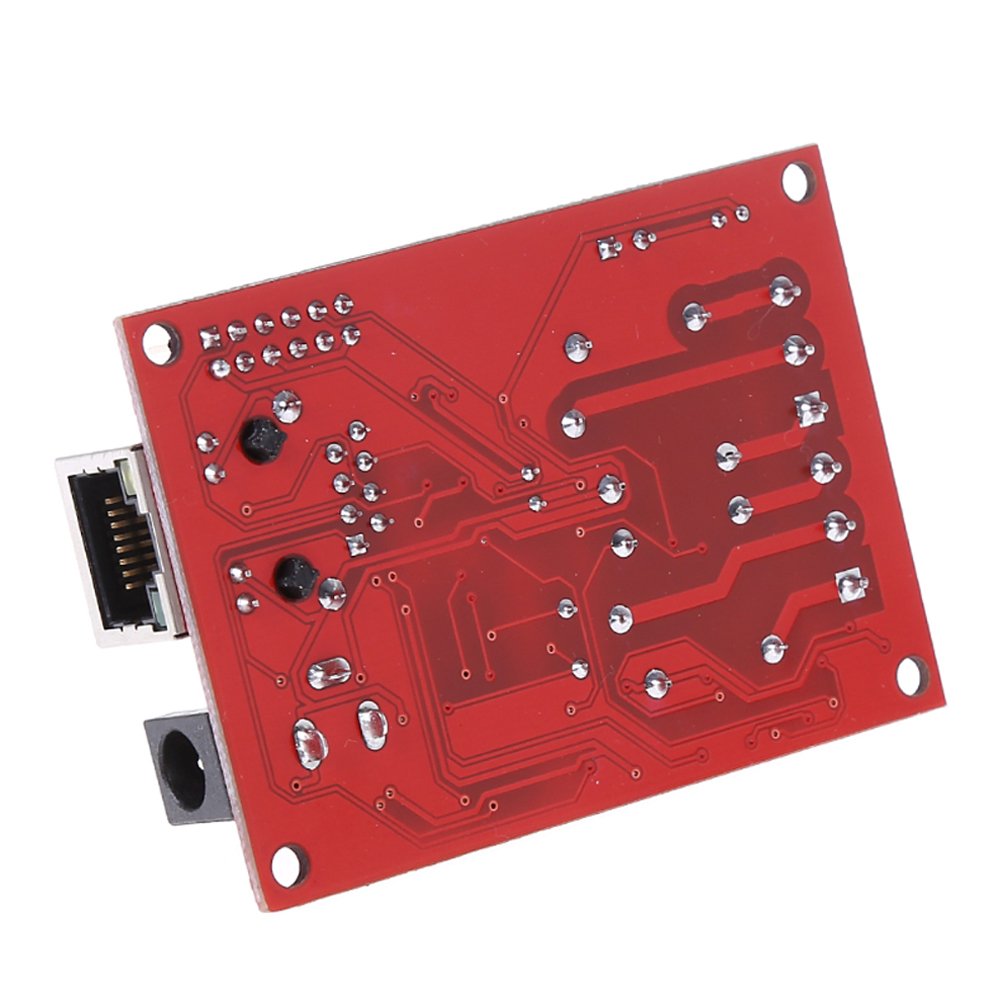
The Wangdd22 Electronic Kit is a cutting-edge circuit board featuring a STC microcontroller, designed for industrial applications. It includes a 2-way relay system with individual status indicators, remote control capabilities via TCP/UDP, and enhanced security through local password protection, making it a reliable choice for tech-savvy professionals.
P**V
Works Great
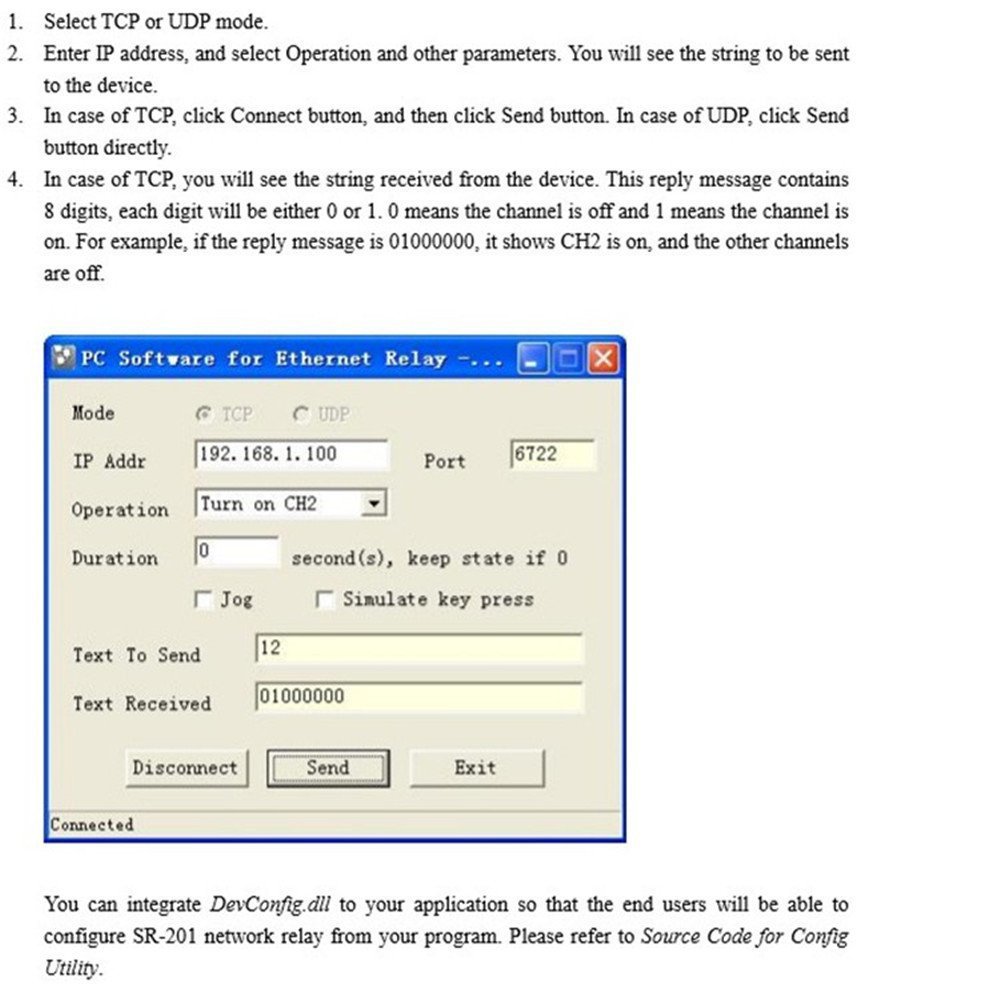
Ordered one, and it works as advertised. Hooked it up to my coffee pot, and now I can control it through my phone. The documentation is downloadable from the link (and password) in the item description. Since the documentation was not super helpful, I wrote a python script to help interface with it.import socketimport sysdef main():# Create a socketsock = socket.socket(socket.AF_INET, socket.SOCK_STREAM)# Connect to the Ethernet Relay Board's default IP address on port 6722sock.connect(("192.168.1.100", 6722))# Accepts number as a command line argument# 11 - Turn on Relay 1# 21 - Turn off Relay 1# 12 - Turn on Relay 2# 22 - Turn off Relay 2sock.send(sys.argv[1])# Returns an 8-bit binary number with the position of the bit representing the relay# 10000000 means that relay 1 is on, while relay 2 is off# 01000000 means that relay 2 is on, while relay 1 is off# 11000000 means that both relay 1 and relay 2 are onstatus = sock.recv(1024)# Print the returned valueprint(status)# Close the connectionsock.close()main()
A**R
Three Stars
Product is OK but No Manual ~!
M**E
Hardware may be OK but the software is horrible
The unit comes with a hard-coded IP address of 192.168.1.100. In order to get the config utility to work, you need a 192.168.1.x network segment. Once you have that and can ping the device, the config utility can be used to set the IP address to something else. Unfortunately, once you do that, the config utility can not see it any more since it's also hard-coded to 192.168.1.100.The documentation is very skimpy. I suppose to figure out how to control it you need to reverse engineer one of the applications. Not hard but why?I like the power supply for it - 9-24v via screw terminal or 5-24v via plug. Relay terminals are well marked and can handle 10a
B**N
Don't waste your time.
Not instruction or support. I sent it back. I do IT for a living and couldn't figure it out.
A**N
Technical Details
I loaded up Wireshark and reverse-engineered the network protocol. Here are my notes, in case anyone else would rather avoid using the provided software:The Wangdd22 Ethernet-controlled relay board listens on three TCP ports:5111: Configuration interface6722: Relay control interface6723: Unknown (possibly an optional web interface?)The relay control interface is very simple. To change the state of a relay, send any of the following strings:11: Turn relay 1 on21: Turn relay 1 off12: Turn relay 2 on22: Turn relay 2 offThe board will respond with an 8-digit big-endian binary string giving the state of the relays (so only the first 2 digits matter). 0 = relay off, 1 = relay on.The configuration interface accepts text commands in the following format:#<command digit><random number>[,command parameter];Commands are a single hexadecimal digit. The random number is a 1-4 digit number that changes every time the configuration utility connects. There is no obvious pattern and using 0 as the number seems to work just fine. The board will respond to most commands with one of the following messages:>OK; Command accepted>ERR; Malformed command stringThe exception is the Get Configuration command, where the board responds with a configuration such as:Board IP addr Netmask Def GW * ?? Serial number RemCntl GW RemCntl addr RemCntl enable>192.168.1.100,255.255.255.0,192.168.1.1,,0,2523,F721C43E0C2420000000,192.168.1.1,connect.tutuuu.com,0;* = Restore previous relay state after power loss (0 = off, 1 = on)The remote control feature seems to be a web gateway hosted on tutuuu.com, which is the source of the board control software. I'm not using that, so I didn't bother experimenting with it.The useful commands are (in proper format with example values):#10; Get Configuration#20,192.168.1.100; Set board IP address to 192.168.1.100#30,255.255.255.0; Set board netmask to 255.255.255.0#40,192.168.1.1; Set board default gateway to 192.168.1.1#60,1; Enable restore previous relay state after power loss#70; Save the configuration and reset the board (does not properly close the TCP connection if the IP address changes)It's easiest to execute one command per TCP connection. Both the configuration and relay control interfaces can be operated via netcat for testing purposes.
A**T
Great cheap relay
Great cheap relay. Very basic command structure allowing virtually endless integration capabilities.Default IP is 192.168.1.100Easiest basic control is to telnet to the device on port 6722 and issue simple string commands: 11 turn on relay 1, 12 turn on relay 2, 21 turn off relay 1, 22 turn off relay 2.Have not found English config util or manual. On the website you can get the config util in Chinese and muttle though the IP config. Beyond that you can control it via VB, C++, PHP, Python, console app like Putty, etc... Very simple and straight forward.
U**N
works as expected
code samples are sorely outdated but ehh...
S**I
Any document?
No guide, no instruction makes it less usable
Trustpilot
2 weeks ago
2 weeks ago
1 week ago
3 days ago