Buy anything from 5,000+ international stores. One checkout price. No surprise fees. Join 2M+ shoppers on Desertcart.
Desertcart purchases this item on your behalf and handles shipping, customs, and support to Botswana.
๐ Connect with Confidence!
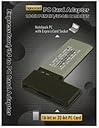
The Digigear 16bit/32bit CardBus PCMCIA Adapter is a versatile solution for connecting various PCMCIA and CardBus applications, ensuring compatibility with both 34mm and 54mm ExpressCard slots. With user-friendly LED indicators, dual voltage operation, and hot swap support, this adapter is designed for seamless integration into your tech ecosystem.
| ASIN | B003HS7YVU |
| Best Sellers Rank | #200 in Laptop Network Adapters |
| Brand | Digigear |
| Compatible Devices | Personal Computer |
| Customer Reviews | 4.2 out of 5 stars 30 Reviews |
| Hardware Interface | Express Card |
| Item Weight | 0.02 Pounds |
| Manufacturer | Digigear |
| Mfr Part Number | PCEXP |
| Model Number | PCEXP |
| Operating System | Windows 7, Windows XP |
| Style | Classic |
| Style Name | Classic |
| UPC | 857696001183 |
| Unit Count | 1 Count |
T**Y
Happy I got it working!
Hello there. I saw, in the questions, a guy giving up trying to make the card work on a 64bit Windows 7 computer. I got it to work on my 64bit Windows Home Premium computer. I went and downloaded the Panasonic 64bit P2 drivers from Panasonic- http://www.business.panasonic.com/support-avtechnology-professionalvideo-softwaredownloads, restarted computer and plugged the card in. I put the P2 card in the adapter and it beeped but still wouldn't see the P2 card. I looked in Device Manager and I had an exclamation point on "Mass Storage Controller". I clicked on it, computer looked for updated driver and found the folder with the Panasonic P2 card driver. It installed. Exclamation point disappeared and it saw contents of P2 card perfectly. I was going to return adapter because I couldn't get it working at firstbut am glad I didn't. Works great and I can download P2 card contents to my laptop and continue shooting on my other cards.
P**A
it worx!
this thing works well by itself, but be aware that there are cards whose drivers won't be able to deal with it due to odd addressing when stuff goes through pcie bridge, and also DMA things can be a deal breaker
S**S
It Works Great
Works great
R**R
Works Great, lasts long time
Not a lot of call for these. You either need something like this or you don't. Well, I do occasionally, and this one has done the job. the only quirks I've seen with it is that I cannot eject the media 'properly' (using the eject media / remove hardware icon you're supposed to use before you take out a removable drive) When I try to eject the media, it won't let me because it's in use by the card reader, when I try to eject the card reader, it won't let me because it's in use by the cardbus, when I try to remove the cardbus, it won't let me because it's in use by the card. There might be a trick to doing it right, but so far I've always just pulled it out when it failed the first time, and so far no ill effects.
A**Z
Works with Windows XP Pro
Exactly what I expected! FYI, works PERFECTLY with Windows XP Pro (32bit) SP3, shows up as Generic Cardbus Adapter. Can even use my old Cognio Spectrum Card, which wouldn't work with the bulky Dual Adapter! The card does stick out a bit but it was fine with me. I insert the adapter 1st, then insert my old card into the adapter 2nd, hold on to the adapter so it doesn't eject accidentially. 100% detection success with all my cards. Very pleased!
H**L
This Product is not worthy of a single star. STAY AWAY.
We use these adapters at my company for PLC programming applications. We already had two such adapters at the office (working fine for years now) so I made sure to purchase the exact same device made by the same manufacturer/seller. The device has power and access LEDs that should emit when inserted into the slot. One of the adapters does not light up at all and does not appear in Device Manager in Windows 7 Pro 64 bit. When using this same adapter on another laptop, only the power LED emits but the device is still not detected in Device Manager. The other newly purchased adapter exhibits the same behavior on either laptop (only power on, no access, no detection in Win DM). When comparing these adapters to the original working adapters, the only difference is that the new adapters come with a VPP 12V support label. I doubt this is the cause of the problem but it is the only noticeable difference. I have already tried the troubleshooting steps on Digigear's website and what's posted on comments here but nothing worked. I understand that the adapter itself does not require a driver and therefore should communicate with the PC just like the originals do as it claims to be a plug-and-play, hot-swappable device. The only thing more disappointing than these adapters is the seller's inability or disinterest to respond to multiple calls, messages, and emails requesting support. After exhausting all possible scenarios the only thing left to do is request a refund. Going to try StarTech as it has better reviews and more purchases. In short, don't waste your time.
J**N
Works, but reboot freezes if card inserted
Purchased this ExpressCard to Cardbus adapter to allow using an older RME Hammerfall HDSP Cardbus card in an HP EliteBook 8570p running Windows 7 Pro x64 sp1. The adapter and HDSP drivers install correctly, and everything works correctly until the system is rebooted. On reboot, the system freezes at BIOS startup unless the adapter is removed. Once the system boots, the adapter can be inserted and used, but this is a hassle. The StarTech CB2EC ExpressCard to Cardbus adapter works perfectly. Mechanically, these are a bit flimsy because the Cardbus card extends 11cm out from the face of the ExpressCard slot, but that's the price you pay for saving the many hundreds of dollars needed to purchase the newer ExpressCard version of the HDSP card.
M**P
Satisfactory Performance
I was able to install my PCMCIA card OK in my WIN7 machine with Express slot. However, the application I am using could not recognize the card due to a WIN7 incompatibility, I believe. I had to revert to an XP machine to run my app, so I do not know any more about the actual performance of this adapter card. I know of others who use it and it perfoms well for them.
Trustpilot
2 weeks ago
4 days ago