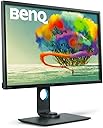
🎯 Design with precision, work without limits.
The BenQ PD3200U is a 32-inch 4K UHD IPS monitor tailored for creative professionals demanding color accuracy and ergonomic flexibility. Featuring 100% Rec.709 & sRGB color spaces, CalMan and Pantone validation, plus a HotKey Puck and built-in KVM switch, it streamlines multi-device workflows. Eye-Care technology and built-in speakers enhance comfort and convenience, making it a powerhouse for design, animation, and CAD/CAM applications.


| ASIN | B01MY142C0 |
| Adaptive Sync | G-Sync Compatible |
| Additional Features | 100% Rec.709 & sRGB, Color Accurate Design Monitor, Delta E≤3, Pantone Validated, calman verified |
| Aspect Ratio | 16:9 |
| Best Sellers Rank | #703,159 in Electronics ( See Top 100 in Electronics ) #13,372 in Computer Monitors |
| Brand | BenQ |
| Brightness | 250 cd/m² |
| Built-In Media | DP to mDP1.2 cable, HDMI2.0 cable, USB 3.0 cable, Hotkey Puck |
| Color | Black |
| Color Gamut | 100 |
| Connectivity Technology | HDMI |
| Contrast Ratio | 1000:1 |
| Customer Reviews | 4.3 out of 5 stars 595 Reviews |
| Display Resolution Maximum | 3840 x 2160 Pixels |
| Display Technology | LED |
| Display Type | IPS |
| Global Trade Identification Number | 00840046035471, 04718755066160 |
| Hardware Connectivity | HDMI |
| Has Color Screen | Yes |
| Image Contrast Ratio | 1000:1 |
| Item Dimensions D x W x H | 11.2"D x 29.1"W x 25.3"H |
| Item Type Name | BenQ 32" 4K Designer Monitor (PD3200U), 3840x2160 4K UHD, IPS, 100% Rec. 709, sRGB, CAD/CAM, KVM, DualView |
| Item Weight | 27.6 Pounds |
| Manufacturer | BenQ |
| Model Name | PD3200U |
| Model Number | PD3200U |
| Mounting Type | Wall Mount |
| Native Resolution | 3840x2160 |
| Number of Component Outputs | 1 |
| Picture Quality Enhancement Technology | AQCOLOR Technology |
| Power Consumption | 80 Watts |
| Refresh Rate | 60 Hz |
| Resolution | 4K UHD 2160p |
| Response Time | 4 Milliseconds |
| Screen Finish | Glossy |
| Screen Size | 32 Inches |
| Screen Surface Description | Glossy |
| Shape | Flat |
| Specific Uses For Product | Graphic Design, Monitor for Mac, Photo Editing |
| Total Number of HDMI Ports | 1 |
| Total USB 3.0 Ports | 2 |
| Total Usb Ports | 2 |
| UPC | 840046035471 |
| Unit Count | 1.0 Count |
| Viewing Angle | 178 Degrees |
| Voltage | 220 |
| Warranty Description | 3 Year Warranty |
| Warranty Type | 3 Years Manufacturer Warranty |
J**S
Amazing cost effective productivity, gaming, and general use monitor!
This is an awesome monitor for productivity, media entertainment, and gaming! After my wife usurped my last computer setup it was time to build a new rig and purchase at least one new monitor. The monitor was the most difficult decision for me. As a family man, software engineer, gamer, media hobbyist and avid tv/movie watcher I need a monitor setup that was affordable and still provided large real estate, high resolution, vivid and accurate colors, good performance. For the price of two mediocre monitors I was able to purchase this one large awesome monitor. The 4K is very nice in that it provides me with a lot of flexibility arranging windows and work areas when doing development and media editing. So far I haven't missed having a second monitor. I was worried about text being to small, but the images are so crisp my old eyes don't strain to read. For refresh, accuracy, and crispness getting an IPS panel monitor was a great choice and it works perfectly on this monitor. Videos and games are also gorgeous at 4K, but if I need to down the resolution and up the refresh rate the monitor is a rock star for first person shooters as well. I'm still only an average gamer, so I imagine if you want an amazing monitor for first person shooters and competitive play you might pick something else, but I would say for 80% of gamers this monitor would be an awesome addition for you. There are plenty of connections on this monitor for multi 2 HDMI's, one display port and one mini display port. So it is going to support my laptop, gaming machine, and 4K console easily! I must mention one thing that really bummed me out though, which is not an issue with the monitor but with perhaps the packaging facility. The monitor came scratched near the center of the view port. So if you get this monitor check the screen closely at first, the scratches didn't appear when the monitor was on. However, for a brand new monitor I don't expect scratches. The replacement from Amazon wasn't prompt, again not a problem with the monitor but something to be aware of if purchasing through the site. All in all, I am now a fan of BENQ and very happy with this monitor. If you are on the fence, like I was, about picking a cheaper 4K IPS monitor for gaming, productivity, and general use I hope this helps easy your fears about this particular monitor and brand!
M**E
Best Display for the Money
UPDATE: Changed review to 5 stars. On paper, this is a great monitor. The unit I received from Amazon had some issues, but I just installed the replacement BenQ sent me after I opened a support request. At first, they told me to ask Amazon for a replacement, but the next day they told me a new monitor was on the way, and I could use that container to return the defective monitor. Wow, this one is *perfect.* There are no scratches, and no dead pixels. If the update firmware really eliminates the black-screen flickering, then this monitor can't be beat for the money. ORIGINAL TWO STAR REVIEW: This monitor should be great. On paper, it's perfect. It's a 32-inch, 4K monitor, with a built in KVM switch--USB 3 no less--all for less than $800. The fit and finish is good, and all parts are sturdy and stable. The out of box impression is great. When you connect the monitor, you're blown away at first. It's got a great picture, with accurate colors. So, why rate it two stars? First, there is a small scratch on the inside of the LCD panel almost at the center of the screen. There's a handful of stuck pixels in the upper right quadrant. But, worst of all, the monitor frequently flickers to a black screen. It's distracting, and often so bad the monitor is unusable. I've put in an RMA request, and I'll give BenQ a chance to fix it before I return it.
S**F
WOW! This monitor lives up to the hype and great reviews
WOW! This monitor lives up to the hype and great reviews (be sure to check out the in depth Tom's Hardware review - this review truly helped make my decision to purchase). I upgraded from a Dell 27" QHD screen and I can't believe how much larger the 32" is in comparison, it has so much screen real estate and enables multitasking in a way you just can't with smaller screens. I've only had it a couple days but I can say, out of the box, it looks wonderful using the sRGB mode with the brightness set at 50%. There is indeed a factory calibration report in the box. The Display Pilot software is a nice bonus (it has tons of options and is convenient to change settings). IPS glow is present, but minimal, it's most evident in the lower left corner on my unit on a completely black screen. The matte finish on the screen isn't distracting and I have no issues working with photos, digital drawings and blueprints/building renderings. Screen uniformity is very good (especially considering this model doesn't have a setting to manage screen uniformity) - it may be slightly brighter in the middle of the unit I received, but again, it isn't distracting. One of the must have features for me was the built in KVM as I use it with a desktop computer (with an Nvidia GTX 1060 6GB RAM connected via HDMI 2.0) and my Surface Pro (2017) (with Iris Plus 640 graphics connected via mini DisplayPort to DisplayPort). I can concur with other reviewers that the KVM functionality of switching between computers isn't "elegant" as you do have to power on your computer manually (no USB power is supplied to the keyboard and mouse when the monitor is in power save mode) and you do have to switch the input and USB Upstream settings separately (Dell has a leg up on their KVM monitors as you can assign a USB Upstream port to a specific input and switching is seamless). HOWEVER, it's not awful - I programmed the touch button shortcuts for: Input, USB Upstream1 and USB Upstream2 - it's very easy to switch. Also, if I don't have my Surface Pro connected and turn on the desktop computer, no action is required on the monitor (provided you leave the HDMI and DisplayPort auto select options turned on). Bottom line - for the size and excellent overall quality of this monitor, there is not a viable competitor at this price point.
A**3
Would recommend this for design and photo/video work.
This is a great monitor that I use for hobby 3D designs. Like fusion 360 design and cam software. The cad mode does help some when designing parts to be machined. It is easier to see lines etc. The hockey puck is great for settings. Better than the buttons on the frame. It also works for gaming as well. 4ms grey to grey is ok for most games. I have a 1ms screen and I can not tell the difference. I was pleased by how movies and photos popped of the screen. Very bright and colorful. And they seemed to be very accurate colors to me. Some I felt like I was seeing the picture in it's full glory for the first time. I use display port so I did not test HDMI. I had no dead pixels and it came calibrated with a paper report. The main problem with 4k resolution is windows 10 and all the tiny fonts. Will they ever fix it? I am happy I bough this. Hope it is reliable over the long run.
C**N
Edited: it is not Benq's problem.
Good: no dead pixel, no bleeding. Color is very good and accurate. The low blue light is very useful. Bad: I bought a Benq GW2765HT almost two months ago, which is a decent monitor. However, for this PD3200U, after I hooked it up with my dell inspiron laptop running windows 10, the monitor looks washed out, way worse than the GW2785HT. I then downloaded the .icm color profile for the monitor but there is simply no way to install the profile so that I can see the profile from display setting for the monitor. Luckily, I have a Plugable usb 3.0 to hdmi 2.0 to which I connected the pd3200u. Then, the .icm profile can be seen in display setting. Once windows 10 takes the correct color profile from Benq, the color of monitor shines! It is a fantastic monitor. So, if without the Plugable (which is a temporary solution) pd3200u cant work with both of my latops. Edited two days later: The color profile can be shown in windows 10 display setting only when the laptop's built-in monitor is connected (I didnt make it connected since I solely use the two external benq monitors). One more note for future buyers: the Intel integrated graphics 630 with the i7 processor makes the monitor a little washed out. You need open intel's graphics setting and set the brightness to be -8. Then, the colors are perfect. Again, this is not benq's problem since I tried to connect the monitor with Plugable usb 3.0 to hdmi 4k adaptor and the monitor has just perfect color without any tuning. There is no flickering issues and benq seems has a high quality control with the expensive monitors (for two monitors that I have bought in 60 days, no dead pixels, no bleeding, and colors are perfect).
B**W
Update: Having the dreaded flicker issue on replacement unit
It's a great monitor that came almost entirely accurately calibrated out of the box according to my Spyder5. I was between this and the Asus 32" equivalent which is $100+ more and I don't regret the purchase at all. It's beautiful and crisp with deep blacks. The build quality is on par with the Dell monitors with a similar stand attachment mechanism. Between the quality, the apparently very attentive BenQ customer support (Taiwanese are the nicest people!) and 3 year warranty, you can't go wrong with this monitor. EDIT: After a few months with this unit it is exhibiting the flicker-to-black issue that many are writing about in the critical reviews. I had the monitor replaced by BenQ but the issue is still there! I've tried on two different computers and the issue is consistent. I will be speaking with BenQ support for another RMA replacement, but this is getting ridiculous. 2nd Update: Unbelievable. The flicker problem is endemic across all units relating to faulty design of the panel. BenQ is knowingly selling faulty units and replacing them with equally faulty ones. Absolutely ridiculous. I will be returning this monitor and buying a different brand.
G**Y
Looked good at first, had some issues & BenQ service was all over it
I loved the 2 32" UHD monitors for the first, oh 50 days or so... until one of them just stopped working. I have these two monitors connected to a Dell XPS 9560. One (in landscape mode) is connected through HDMI (using the supplied cable). The other (in portrait mode) is connected through the MiniDP port (using the supplied DP - MiniDP cable and plugged into a DP on a Thunderbolt dock). The HDMI monitor gave me some problems after I upgraded the Thunderbolt firmware on my Dell, but I was able to get it working again. Today, I unplugged the HDMI port and TB dock to apply a BIOS update. When I plugged everything back in, the DP monitor was fine. The HDMI monitor ... dead. To be clear: the cable is plugged in the same as before. The computer detects the HDMI monitor and acts as if it is there. The BenQ monitor, however, while noticing that the HDMI cable is plugged in, claims there is no signal and the screen stays blank. I have switched between HDMI 1 and 2 on the monitor. I have shut down and rebooted. I have tried a different cable. All the HDMI monitor will do is tell me if the cable is plugged in or not; it displays nothing and continues to claim there is no signal. The "puck" is plugged in but doesn't do anything, even when the only cables plugged in are the puck and power. The front buttons will only bring up an input port selection. Though it seems this may be a "feature" and not a bug, because the DP monitor also does nothing if just powered on but has no signal. The only configuration I set was to turn off Eco mode (as I recall), but if there is some setting that has questionable, I have no way to diagnose that because the OSD menu will not come up. I emailed BenQ, but decided I wanted a faster response so I called too. They were all over the problem. First they explained that the "puck" does not work unless the monitor has a video signal. I see this as a design flaw, which would knock this to a 4-star rating, but their 5-star service convinced me to give back their 5th star. After some discussion and testing, they agreed to replace my monitor and sent me an RMA. I decided to do further testing and after a long call with Dell, learned that the HDMI port on my new Dell was having problems (though Dell only agreed with that after I tested the HDMI port against 2 more monitors with 3 different cables!). As a result Dell is going to replace the MB. I was able to get the monitor that was connected through HDMI to work using an HDMI to USB-C/Thunderbolt converted from CableMatters here on Amazon. The nice part about that is all video goes to through my TB dock and it is at 60Hz! I will retest the BenQ HDMI connection after Dell replaces my MB, and I am confident that if there are HDMI connection issues with the monitor, BenQ will be all over it again. Thanks, BenQ!
S**S
A Nice Monitor For Photo Editing - 100% sRGB and 77% Adobe RGB - A Little Overpriced
I ordered this as I wanted to replace an older WQHD monitor for photo editing, and I also found myself working from home. I ordered this because I wanted another 4k monitor and I hoped this would have more accurate color than the 32" Monoprice CrystalPro 27772 I also own. The build quality of this monitor is excellent. The USB ports are nice, the "puck" interface for handling the on screen controls is a nice feature, I I like that it has two Display port ports when most give you one and a bunch of HDMI. The stand is also solidly built with a nice carry handle and isn't wobbly like many OEM stands are. I've not seen any evidence of screen flicker that other reviews referenced, so I'm assuming I have the updated firmware on the monitor I received. The color is nice. It's comparable to my old WQHD monitor that I purchased in 2012 that cost a similar amount, though my old monitor had glass over the panel and better build quality. Initially it was more accurate than my Monoprice CrystalPro, though surprisingly after calibration with my Spyder 4 Pro, the gap closed considerably. I think the Benq has slightly better contrast and on pure white screens the dot pitch of the display is "smoother". I also think the backlight is better on the Benq on pure black screens. Out of the box the calibration is good. After calibration with my Spyder 4 Pro, the contrast seems better and a tiny bit less blue. Even though this is accurate for a factory calibration, I'd still suggest an aftermarket calibration if you want the best out of this monitor. After calibration the Spyder software shows this has 100% sRGB coverage and 77% of Adobe RGB. Surprisingly though, after calibration, both the Benq and the Monoprice monitors showed 100% sRGB coverage, and shockingly, the Monoprice monitor had 79% sRGB coverage. Not a huge difference, but the Monoprice is a few hundred dollars cheaper, and if you catch a sale, half the price of the Benq. If you're looking for a budget monitor with good color I'd suggest checking out the Monoprice 27772. It has it's own limitations (only 1 DP port, some intermittent flickering issues, no USB ports, etc) but it's a bargain if you don't need the extra features of the Benq PD3200U.
M**L
Au top !
Un rapport qualité prix vraiment impressionnant, le meilleur compromis pour les pros de la photo / graphisme
B**.
Amazing monitor for programmers
I absolutely love this monitor. It is expensive, it is the most expensive monitor I've ever purchased but so far it is proving to be worth the investment. At 32" I can use this without any font scaling and fully take advantage of the 4k having tons of text on the screen at once which makes me more productive at programming (note: some colleagues look at my screen and still think the font would be too small for them, even on a 32" display, if that is you you can always scale up the font but when you do so the aren't taking fully advantage of having a 4k monitor). Colors and contrast are amazing, side by side with my new HD dell u2415 monitor the dell's blacks look grey by comparison, there is also a extra crispness on this monitor compared to that display. The stand is amazing too and you can orient this in any way you want, horizontal, vertical, any level of tilt and great height adjustment (note: 32" is a bit big to use in portrait mode in my opinion, although it is doable if you are focused on content in the middle of the screen. At this size regular landscape is the ideal orientation in my opinion). Never tried gaming on this display so can't comment, I assume it would be great though.
P**R
Ottimo rapporto Dimensioni Qualità Prezzo
Avevo bisogno di un monitor di grandi dimensioni per avere tutto sotto controllo senza dover spostare le varie palette ogni volta e non necessitavo più di un oggetto super professionale con qualità eccellenti. Questo al mio caso è ottimo
F**N
Bon écran pour l'infographie mais des défauts au niveau du bouton des réglages
Étant infographiste spécialisé dans les perspectives 3D immobilières, les détails ont une grande importance et en tant que professionnel de l'imagerie je suis assez exigeant. J'avais deux écrans auparavant (24 pouces écran infographie Nec avec un écran 27 pouces classique BenQ). Manque de place, je ne peux plus me doter d'un 2ème écran 32 pouces pour l'instant. Pour résumer : ce n'est pas le meilleur écran pour l'infographie par rapport au Nec que j'avais, mais la qualité de la dalle de l'écran est très bien. Tout d'abord, l'écran est pratique et peu se tourner dans presque tous les sens (quoi que, à la verticale pas l'idéal). Concernant l'utilisation d'un autre ordinateur en même temps, le switch n'est pas du tout génial et pratique et est totalement illisible (impossible quand à un zoom en 3d ou photoshop, j'ai tous essayé). Pour un switch, il faut se doter d'un 2ème écran, sinon lecture pour du travail lié à l'infographie impossible (les petits boutons des réglages ne sont pas pratiques). Autre bémol, l'écran s'allume et s'éteint sans cesse quand on bouge légèrement et il faut cliquer plusieurs fois pour que l'écran revienne (pour un travail en infographie lorsque l'on doit travailler rapidement plutôt énervant à la longue). Concernant l'architecture, le cadre a l'air solide et de bonne facture (le cadre ne constitue pas une gêne). Pour l'infographie et qualité de la dalle, par contre je mettrai un bon 4 étoiles (d'autres marques font mieux avec 5 étoiles), les détails sont présents et de qualité. La qualité de la dalle est au rdv avec la calibration de base des couleurs CMJN. Les zooms et détails sont de bonnes qualités également. Pour la note générale, j'aurai mis toutefois 3 étoiles et demi à cause des réglages; BenQ a mal combiné son produit, pour synthétiser : le moteur d'une porche avec une carrosserie assez chip...
C**N
Great monitor for a designer, definitely recommended!
I'm a photographer and videographer and bought this monitor to have better colour accuracy with my photos (and videos) not only on-screen but also when printed. I've only been using the monitor for about a week so far but in that short amount of time I already love it! To be honest I don't notice much of a difference between the colours on it from my old monitor, but that's probably the point...and it's really nice to know that when I edit my photos on my screen, it's 100% accurate to any other display with that accuracy, and will still look better on a not-accurate screen. I love the real estate you get on this thing...I can have about 8 different windows open at a time and see them all on this single display if I need to. It's not a cheap monitor at all, but like most things, you get what you pay for! Also one thing I will mention for fellow Amazon Prime members is that this monitor took about a week to arrive, it did not ship as quickly as most of my other items. It was not a problem for me because I was not in a rush to get it, but just keep that in mind (I live in northern Ontario, most things ship from Toronto but this monitor shipped from BC so it took a few extra days, and also it did not ship as quickly as most of the items I buy on Amazon, that took a few extra days as well).
Trustpilot
2 weeks ago
1 month ago