Buy anything from 5,000+ international stores. One checkout price. No surprise fees. Join 2M+ shoppers on Desertcart.
Desertcart purchases this item on your behalf and handles shipping, customs, and support to Botswana.
🎮 Unlock Ultimate Wireless Freedom Across All Your Controllers
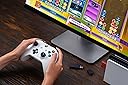
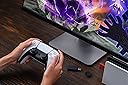
The 8BitDo Wireless USB Adapter 2 is a compact, matte black device that enables seamless wireless connectivity for a wide range of controllers including Xbox Series X|S, Xbox One Bluetooth, PS5/PS4, Switch Pro, and Wii controllers. Compatible with Switch, Switch 2 (with firmware update), Windows, macOS, Steam Deck, and Raspberry Pi, it supports 6-axis motion on Switch and vibration on X-input mode. Advanced customization options allow button remapping, sensitivity adjustments, vibration control, and macro creation, making it a versatile tool for professional and casual gamers alike.


| ASIN | B09M8CVMYF |
| Best Sellers Rank | #450 in Video Games ( See Top 100 in Video Games ) #4 in Nintendo Switch Cables & Adapters #28 in Mac Games & Accessories #94 in PlayStation 5 Consoles, Games & Accessories |
| Brand | 8Bitdo |
| Built-In Media | 8Bitdo Wireless USB Adapter 2 for Switch |
| Color | Black |
| Compatible Devices | Gaming Console |
| Connector Type | Micro USB |
| Current Rating | 1 Amps |
| Customer Reviews | 4.4 4.4 out of 5 stars (6,122) |
| Finish | Matte |
| Input Voltage | 20 Volts |
| Item Dimensions | 3.54 x 2.17 x 0.98 inches |
| Item Weight | 20 Grams |
| Manufacturer | 8bitdo |
| Model Number | 8BitDo USB Wireless Adapter 2 |
| Number of Items | 1 |
| Number of Ports | 1 |
| Package Quantity | 1 |
| Power Plug Type | No Plug |
| Specific Uses For Product | Video Game Console |
| Unit Count | 1.0 Count |
| Warranty Description | 1 Year |
R**Y
Recommended Wireless Adapter
I have only used this adapter for a few hours, but so far it is performing exactly as expected! This allows you to connect a wide array of controllers to your PC or console with close to if not zero latency. I wanted a solution to use my Xbox Elite controller wirelessly , but the Bluetooth connection is a joke with the input lag. This adapter solves that problem, and since I have other controllers I can use those too as a bonus!
W**A
Works great with PS5 controllers!
When it comes to d-pad based games, Sony's controllers are undefeated. Xbox controller dpads are too clicky and have no feedback. Nintendo's dpads are great, but their controllers lack triggers (ZL/ZR are just buttons), so they don't work well for games that require analog input. I got some wicked deals on PS4 and PS5 controllers, but I don't have a PS4 or PS5 to utilize them. That's where this dongle comes into play. I put the controller into sync mode (Share + PS button), hold the button on the 8bitdo adapter when connected to USB port, and the controller syncs up lickity split! I've updated mine to the latest firmware from 8bitdo and it works perfectly on Switch 2 (make sure you enable the "Pro Controller Wired Communication" setting) as well as PC. Steam still detects it as an Xinput controller, which is fine since Xinput is guaranteed to work on any game that supports a controller. As long as you're not completely smooth brained, you'll know to press X when the game tells you to press X and not the other X. Right? You got this champ. 10/10 adapter, by the way.
J**O
Good product bad user experience.
This thing works great. Only issue I had was having to update it to work on my switch. Holy moly did that take long. The issue was finding what link to download the fight update option. That took like 2-3hrs. There are no clear videos or write ups that give help.
B**N
Works with DualSense to Switch 2...
Got this half off used knowing many probably returned after not being able to figure it out. There is not a lot of help on their website. Have a conversation with Google Gemini while trying to troubleshoot the set up, but long story short, from their website, get the firmware updater and exact software for this product, rather than the "ULTIMATE" all in one product. Boot the firware updater and plug this thing in WHILE HOLDING THE BUTTON ON IT. The firmware updater will actually see it and you can get it updated, then shift over to the controller pairing software, press the button on the dongle and pair a DualSense to it and press Switch mode for the profile. That's really it, then you restart your Switch and plug the dongle into the dock. Connect the DualSense to the dongle, then for me, I had to USB-C the controller to the second USB of the dock to get the connection to solidify. It was janky, and annoying, but I got there and it's working.
J**Y
Nice and convenient receiver.
Had this adapter for a few months now. I have to say it’s rather seamless in terms of pairing different controllers. The software for the receiver can be a bit difficult to navigate and does allow you to change button layouts and etc which is appreciated. So I’m taking off a star due to the software itself. I ordered this to replace an overheating Xbox wireless adaptor which kept disconnecting from my PC and this current adapter from 8bitdo has done a fantastic job. Overall, i recommend if you want to go truly wireless. I only tested it on the PC side of things but have yet to try it on my Nintendo switch.
S**R
Easy way to use different controllers across devices
This adapter is a really convenient solution if you want to use different wireless controllers across multiple systems. Setup was straightforward — just plug the adapter into the device, pair the controller, and it connected quickly. One of the best things about it is the wide compatibility. Being able to use controllers from systems like Xbox, PlayStation, or Switch on other devices like a PC or Raspberry Pi is really useful, especially if you already have controllers you like using. The adapter itself is small and unobtrusive, so it doesn’t take up much space when plugged into a USB port. Once connected, the controller input felt responsive and stable during gameplay. Overall, this is a great little adapter if you want more flexibility using your controllers across different platforms.
N**S
Totally Useless, Does Not Work on Windows 11 with Xbox Elite Series 2
I bought this to use with my Xbox Elite Series 2 Controller on my PC, running Windows 11. Previously I had purchased another, cheaper USB dongle to pair this controller to, and it honestly worked great. I bought this 8bitdo dongle when that cheaper dongle bent, as I thought it would be nice to have an upgraded dongle that was not bent. This one had good reviews, so I really looked forward to having a more reliable dongle for my controller when gaming on my PC. Unfortunately, this product is completely useless for my use case, as it simply does not work at all. I am able to pair my controller to the dongle, but the dongle simply does not transmit any controller button inputs to my PC. I have tried updating the firmware to no avail, and I have tried using 8bitdo's software to troubleshoot my issue, but said software is completely unhelpful, and does not seem to do anything at all. I have scoured the internet for troubleshooting tips - most of which come from third party sites, as 8bitdo's website seems to have major issues and mostly doesn't seem to even work - but nothing I have tried has made this 8bitdo dongle function as it is advertised. I have since returned to using my old, cheap, bent USB dongle, which still works great, despite requiring absolutely no drivers or software or firmware updates. This 8bitdo dongle seems to require a lot of software and firmware updates, along with major troubleshooting, and still does not have a guarantee of working. I am incredibly disappointed with this product, and moreover I am disappointed with myself for not returning it within the return window, as this thing is just totally useless. I cannot recommend this product at all, if you intend to use it on a Windows 11 PC with an Xbox Elite Series 2 controller.
C**.
Set Up Once & Connect Wherever!
This works to connect my Xbox Elite 2 controller to both my pc & my switch! Only had to set up the connection once and can switch the adapter between the two systems without having to re-pair my controller. Definitely highly recommend!
A**S
Great little device.
It's worked great! Obviously I tested a Switch 2 Pro controller and it did not work but wanted to test. Works with my Xbox Controller on PC and my Switch Pro 1 controller on PC. I tested it on PS5 and it didnt seem to work. Tried connected a PS5 controller to Switch, it didnt work. So make sure you fully read the description of this item before purchasing as it seems to only work with controllers stated. That being said, it's been a dream to use my xbox controller wirelessly since my computer has such garbage bluetooth. I got it for way cheaper than the price of 26CAD (it's current price at time of this review) I think I paid under $20 so wait for a sale if you want.
魚**ト
遅延なく安定している
プラットフォーム Windows 使用パッドXbox 初回だけですが、HPからアプリケーションをダウンロード、ソフトを起動、パッドの通信ボタンで認識させる。 次、ゲーム側の認識が必要で、アダプターのボタンを押して、パッドメニューボタンを押したら、Windowsで使用しているXboxだと認識してくれた。ゲームによるだろうが、この手順は必要で、ゲーム側がSwitchなどのパッドと認識するらしい。 一手間かかるが、遅延もなく高難度で使用できている。Microsoftは、何故かわからないがXboxのワイヤレスアダプターを販売していない。Bluetoothは不安定なため、いささか使い物にならない。オンラインで高難度プレイする人なら、理解できるかと思う。価格も高くない、仮に壊れたとしても手に入れやすい。
K**R
Works out of the box
Works exactly as intended with an xbox series s/x controller after paring. The 8BitDo Windows app is neccessary for it to work and map custom buttons.
T**L
ماتشغل مع كل الكنترولرز
للأسف القطعة ماتشتغل مع كل الكنترولرز حتى لما سويت آبديت لها, انا استخدم كنترول البلايستيشن 4 و3 على البي سي
I**X
Funciona legal, sem input delay
Funciona perfeitamente com o dualshock 4. Uma eu notei é que fica impossível de mudar a cor do led do controle, sempre que fica conectada ao pc, fica com a cor verde. Não é possível mudar pela Steam. Outra questão é, não é mais possível ver quanto de bateria resta no controle, pelo DS4Windows, você tem que desligar o controle e usar um cabo USB pra isso.
Trustpilot
3 days ago
2 months ago